What Does VRAM Compression Do to Pixel Art in Godot 4? Colors and Memory Measured
November 17, 2026 · 7 min read
One 56 color sprite sheet, six Godot 4.7 import modes. We counted the colors, changed pixels, file sizes and texture memory each one produced.
Open the tool from this article — free, in your browser, no signup.
Godot 4 imports every 2D texture as Lossless unless you tell it otherwise, and the Import dock offers four other modes that promise smaller files or less video memory. For photos and 3D textures those trades are often worth it. Pixel art is different: a sprite with a few dozen exact colors has nowhere to hide an error. We imported one SpritePilot sprite sheet in every mode, then measured what came out.
The short version: VRAM Compressed cut texture memory by 4× in data, but the 56 colors in our sheet became 260 and a purple bat's face turned gray. Lossy was the worst of all and, to our surprise, produced a bigger file than Lossless. Of the compressed formats, ASTC (the mobile High Quality option) was the only one we would consider for pixel art.
The sheet
We used four creatures from our free CC0 Creatures pack: bat, bee, fish and beetle, eight 32 × 32 frames each. We put the 32 frames into one GIF, converted it with GIF to Sprite Sheet, sent it to Export & Download and saved a 192 × 192 PNG (6 × 6 grid, four cells empty). The file is 10,484 bytes. It has 56 colors, and every pixel is either fully opaque or fully transparent, which is typical of pixel art and the hardest case for any format that approximates.
How we tested
Godot 4.7.2, Forward+ renderer on Metal (Apple M4 Pro). We made six copies of the PNG and gave each one a different Compress Mode in the Import dock: Lossless, Lossy (default quality 0.7), VRAM Compressed, VRAM Compressed with High Quality ticked, VRAM Uncompressed and Basis Universal. Mipmaps stayed off, as they are by default. We also turned on Import ETC2 ASTC in Project Settings, which makes Godot write the mobile versions of each VRAM compressed texture next to the desktop ones.
For each copy we recorded:
- the size of the file Godot writes to
.godot/imported, which is what ends up in your exported game, - the format the texture is stored in, read from the loaded image,
- the texture memory the renderer reported before and after loading it (
RenderingServer.get_rendering_info), - the pixels Godot decodes, compared with the original PNG pixel by pixel.
To make sure the decoded pixels are what players see, we also drew each texture at 1:1 with Nearest filtering and captured the screen. On fully opaque pixels the capture matched the decoded image exactly in every mode except VRAM Compressed, where the GPU and Godot's decoder disagreed by at most 2 levels on 5,572 pixels. That is too small to change any result below. The mobile ETC2 and ASTC files can't be drawn on this Mac (it loads the desktop versions), so for those we only have Godot's own decoding.
Results
"Pixels changed" and "Off by 16+" count opaque pixels whose red, green or blue moved at all, or by 16 or more levels out of 255. The 16 level line is our own cut off to separate tiny drifts from real color shifts. Percentages are of the sheet's 9,860 opaque pixels.
| Import mode | Stored as | File on disk | Texture memory reported | Colors (original 56) | Pixels changed | Off by 16+ | Largest error |
|---|---|---|---|---|---|---|---|
| Lossless | RGBA8 | 4,596 B | 147,584 B | 56 | 0 | 0% | 0 |
| VRAM Uncompressed | RGBA8 | 147,508 B | 147,456 B | 56 | 0 | 0% | 0 |
| Lossy | RGBA8 | 11,146 B | 147,456 B | 9,008 | 9,857 | 53.4% | 192 |
| VRAM Compressed | DXT5 (BC3) | 36,916 B | 65,536 B | 260 | 9,836 | 30.5% | 140 |
| VRAM Compressed, High Quality | BPTC (BC7) | 36,916 B | 65,536 B | 799 | 8,820 | 15.5% | 165 |
| Basis Universal | BC7 on this Mac | 10,214 B | 65,536 B | 875 | 9,261 | 28.8% | 158 |
| VRAM Compressed, mobile | ETC2 RGBA8 | 36,916 B | not measured | 1,029 | 9,860 | 44.2% | 205 |
| High Quality, mobile | ASTC 4×4 | 36,916 B | not measured | 822 | 8,093 | 3.9% | 140 |
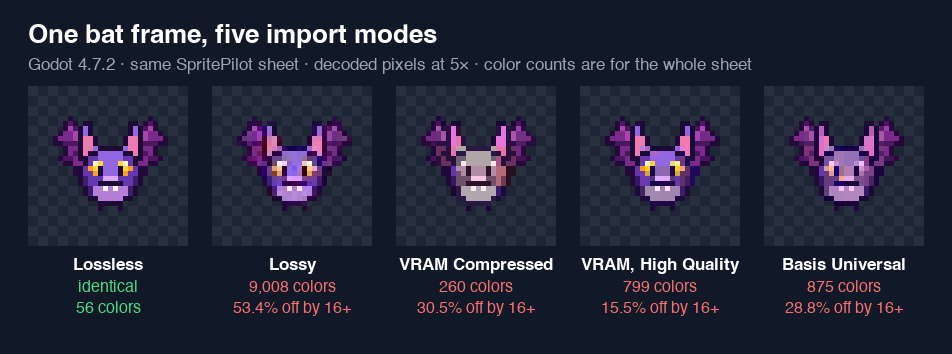
Lossless costs nothing in quality and the least on disk
Lossless gave back every pixel exactly, and its imported file was 4,596 bytes, less than half the 10,484 byte PNG we exported. Godot re-encodes the image when it imports it, so the PNG's own compression doesn't carry over. VRAM Uncompressed holds the same pixels but stores them raw: 147,508 bytes on disk for no gain in memory or quality.
Lossy was bigger and worse
We expected Lossy to trade some quality for a smaller file. It did the opposite: the file came out at 11,146 bytes, 2.4 times the Lossless one, and nearly every opaque pixel changed. The 56 colors became 9,008. Lossy compression is designed for photographs, where smooth gradients hide small errors; hard pixel edges are the worst case for it, and here the encoder needed more bytes, not fewer, to describe them. It also saves no memory at all, because the GPU still gets plain RGBA8 pixels: the renderer reported 147,456 bytes, the same as Lossless. For pixel art there is no reason to pick it.
VRAM Compressed: a quarter of the memory, and the colors move
The VRAM modes are the only ones that make the texture smaller on the GPU. On desktop, VRAM Compressed stores the sheet as BC3 and High Quality as BC7. Both use 1 byte per pixel against 4 for RGBA8: the stored data was 36,864 bytes against 147,456. The renderer's own counter reported 65,536 bytes for each compressed texture, more than the data itself; we didn't dig into why, but it was still less than half of the 147,456 for Lossless.
The cost is the colors. These formats store each 4 × 4 block of pixels as a few base colors plus a pattern of blends between them. A pixel art block often holds three or four unrelated colors, and the format has to bend them toward its palette. That is how a purple face with yellow eyes and pink ears ends up gray in BC3.
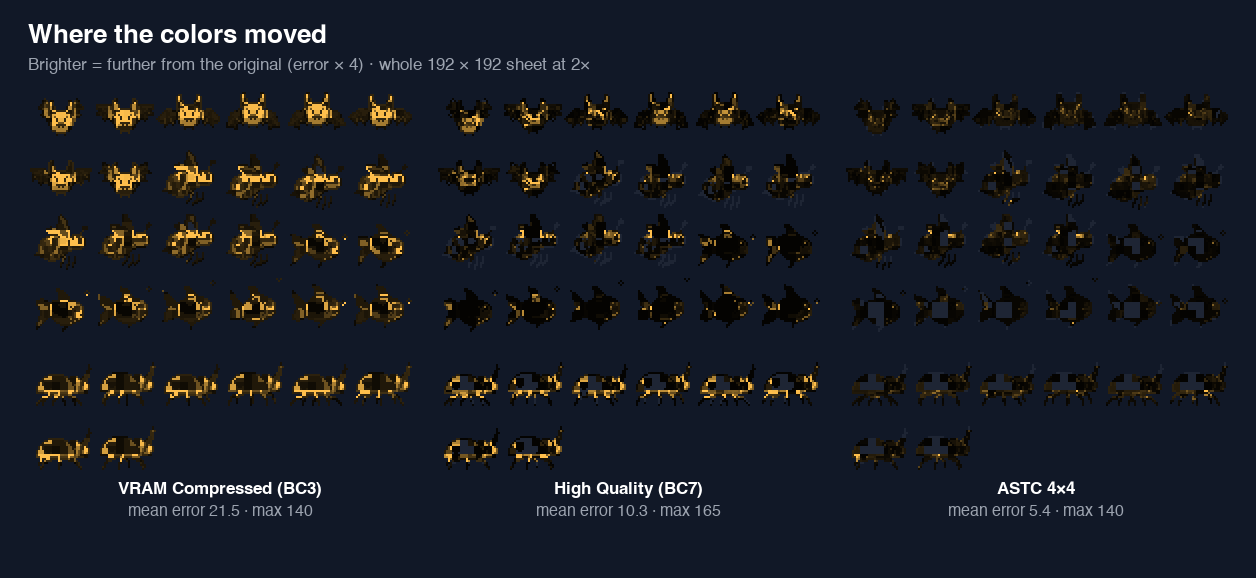
High Quality (BC7) halved the share of pixels that moved 16 levels or more, from 30.5% to 15.5%, for the same memory and the same file size. If you do use VRAM compression on desktop, tick High Quality. Its largest single error was actually bigger (165 against 140), so check your sprites rather than trusting the average.
Basis Universal produced the smallest compressed file, 10,214 bytes, because it stores an intermediate format and converts it when the game loads. On this Mac it became BC7, but with more error than BC7 imported directly: 28.8% of pixels off by 16 or more, close to BC3. It also nudged the alpha of 2,128 pixels by 1 level, which you won't see.
The mobile formats: ETC2 and ASTC
With Import ETC2 ASTC on, VRAM Compressed also writes ETC2 and High Quality writes ASTC 4×4, the formats phones use. They differ more than their desktop twins.
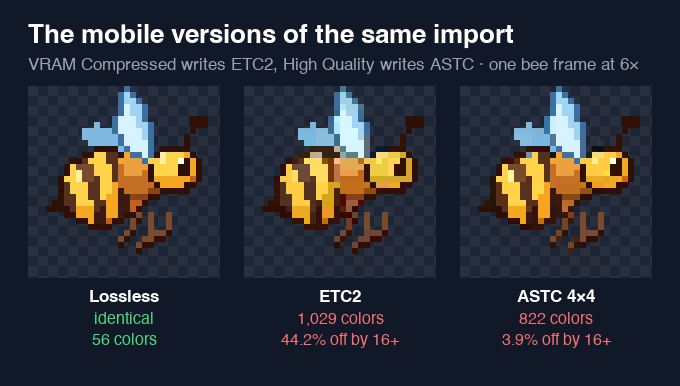
ETC2 was the least faithful format we measured: every opaque pixel changed, 44.2% by 16 levels or more, with a worst error of 205. ASTC was the best of all the compressed options by a wide margin: 3.9% off by 16 or more and a mean change of 5.4 levels on the pixels it touched. Its one weakness was alpha: 14 edge pixels lost or gained transparency, by up to 116 levels, which can show as a faint fringe on a sprite outline.
What the memory saving is worth
For a sheet this small, none of it matters: Lossless used 147,456 bytes of texture memory. The saving grows with the sheet. A 2048 × 2048 sheet is 16 MiB as RGBA8 and 4 MiB of data in any of the 1 byte per pixel formats above. If you are packing dozens of large sheets for a phone with little memory, that 4× can be real. How Big Can a Sprite Sheet Be? has the device limits and the memory arithmetic.
The file on disk tells a different story. Every VRAM compressed file we measured was 36,916 bytes, eight times the Lossless import, because those formats are designed for fast decoding, not small downloads. Only Basis gets close to Lossless on disk, and it paid for it in color.
What we'd do
- Keep pixel art on Lossless, the default. It was exact, and it was the smallest file Godot wrote.
- Never use Lossy for pixel art. In our test it was larger than Lossless, changed nearly every pixel and saved no memory.
- If memory forces compression on mobile, use VRAM Compressed with High Quality, which gives ASTC on phones. It was the only compressed format that kept almost all of our pixels close; check outlines for the alpha fringe.
- On desktop, prefer High Quality (BC7) over plain VRAM Compressed (BC3), and look at your sprites at game zoom before you ship it.
- If one sheet also goes on a Sprite3D, open the Import dock afterwards. Godot can switch textures it detects in 3D to VRAM Compressed (the Detect 3D setting), and the colors in your 2D sprites change with it.
The sheet in this test came straight out of Export & Download as a PNG. For how PNG, WebP and JPG files compare before Godot gets them, see PNG, WebP or JPG for Game Sprites?; that post's rule that every format costs the same memory holds for those files, and VRAM compression is the exception.