Do Padding and Extrude Stop Edge Bleeding in Godot 4? We Measured It
November 17, 2026 · 8 min read
We rendered six SpritePilot exports in Godot 4.7 under Nearest, Linear and mipmaps, then counted every wrong pixel. Padding alone failed; extrude and Filter Clip worked.
Open the tool from this article — free, in your browser, no signup.
Most advice about lines between sprites says the same thing: add padding, add extrusion, use Nearest filtering. We wanted to know which of those actually matters in Godot 4, so we exported one small sheet six ways from SpritePilot, drew it in Godot 4.7.2 in 1,260 captures, and counted every pixel that came out the wrong color.
The short version: with Nearest filtering we never saw a single wrong pixel, padding or not. With Linear filtering, padding on its own did not help at all: it only changed the color of the lines. Extrude 1 fixed every Linear case we tried until mipmaps came in, and Godot's own Filter Clip option fixed them all without changing the sheet.
The sheet and the scene
We wanted the worst case, so the art is four flat 16 × 16 tiles that run color to the edge: green, magenta, blue and yellow, each with a small dark square in the middle. If anything from a neighbor leaks into the green tile, it shows.
We drew the four tiles as a GIF, opened it in GIF to Sprite Sheet, sent it to Export & Download, left Trim off and downloaded the Godot JSON format six times with different Padding and Extrude values.
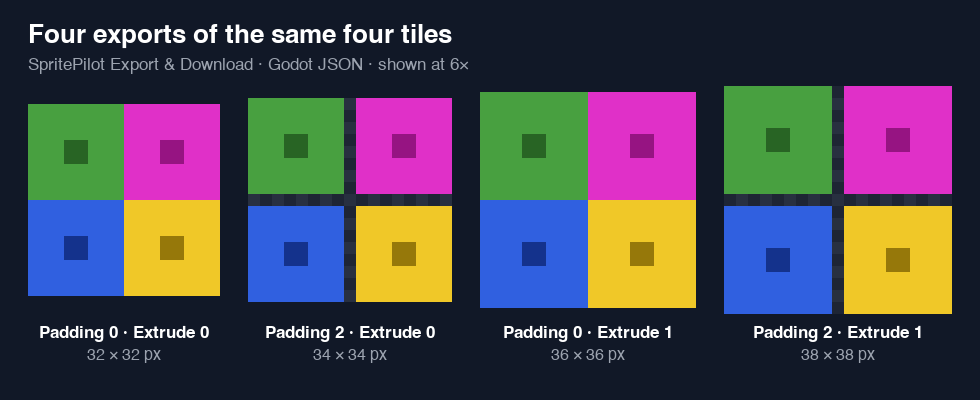
In Godot we built the scene a game would use: a 4 × 3 floor of Sprite2D nodes, each using an AtlasTexture whose region came straight from the exported JSON, all showing the green tile. A Camera2D inside a 240 × 180 SubViewport looked at the floor over a black background. We left the PNG on Godot's default import settings (Lossless, no mipmaps), then saved a capture for each combination of:
- six sheets: padding 0, 1 or 2 with extrude 0, plus extrude 1 with padding 0 and 2, and extrude 2 with padding 2,
- filters: Nearest, Linear, Linear with the AtlasTexture's Filter Clip turned on, and Linear Mipmap on a copy imported with mipmaps,
- camera zoom 1, 3, 0.5 and 0.25,
- ten camera positions a fraction of a pixel apart at zoom 3 and zoom 2.5, the way a smoothed camera drifts while following a player.
That is 420 captures. We ran the whole set three times: on the Forward+ renderer (Metal, Apple M4 Pro), on the Compatibility renderer, and on Forward+ again with Snap 2D Transforms to Pixel and Snap 2D Vertices to Pixel switched on.
A small script then checked every screen pixel that lands inside the floor, skipping a one pixel border around each dark square. Each of those should be exactly the tile's green. Anything more than 4 off in any channel counted as wrong. If its red or blue went up, the color came from a neighboring tile. If it only got darker, the edge had turned partly transparent and the black background showed through.
Results
Counts are wrong pixels in the whole floor, out of roughly 23,700 checked pixels at zoom 3 and 16,500 at zoom 2.5. "10 of 10" means every one of the ten camera positions had wrong pixels.
| Sheet | Nearest, all shots | Linear, zoom 1 | Linear, zoom 3 | Linear, zoom 3, camera moving | Linear, zoom 2.5, camera moving | Linear + Filter Clip |
|---|---|---|---|---|---|---|
| Padding 0, Extrude 0 | 0 | 0 | 1,140 (neighbor colors) | 1,137 to 2,256, 10 of 10 | 945 to 1,416, 10 of 10 | 0 |
| Padding 1, Extrude 0 | 0 | 0 | 1,140 (dark) | 1,137 to 2,256, 10 of 10 | 945 to 1,416, 10 of 10 | 0 |
| Padding 2, Extrude 0 | 0 | 0 | 1,140 (dark) | 1,137 to 2,256, 10 of 10 | 945 to 1,416, 10 of 10 | 0 |
| Padding 0, Extrude 1 | 0 | 0 | 0 | 0 | 0 | 0 |
| Padding 2, Extrude 1 | 0 | 0 | 0 | 0 | 0 | 0 |
| Padding 2, Extrude 2 | 0 | 0 | 0 | 0 | 0 | 0 |
The Compatibility renderer gave exactly the same counts in all 420 captures, and so did the run with both pixel snap settings on. Neither renderer choice nor snapping changed a single number here.
Linear filtering bleeds even at a whole number zoom
We expected trouble at zoom 2.5. We did not expect it at zoom 3 with the camera on a whole pixel, which is what most "use integer scaling" advice promises will be safe. With Linear filtering it is not.
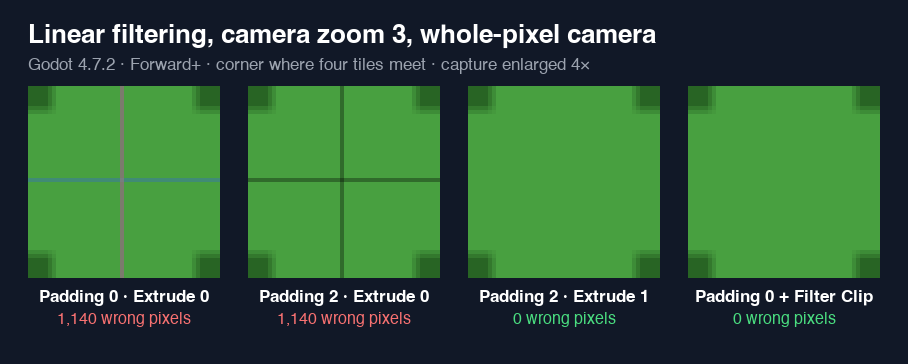
The reason is where the screen pixels land. At zoom 3 each texture pixel covers three screen pixels, and the outermost screen pixel of a tile samples the texture a sixth of a pixel inside the frame's edge. Linear filtering blends the nearest texture pixels, and at that spot a third of the blend comes from the pixel just beyond the edge: whatever sits next to the frame in the sheet. With no padding, that is the magenta and blue tiles. With padding, it is a transparent pixel, so the edge goes see through and you get a dark line instead. In our captures the lines were 78 levels off (colored) and 108 levels off (dark) at their worst.
Padding 1 and padding 2 produced identical counts in every Linear shot. Linear filtering never reaches more than one pixel past the frame, so one empty pixel already catches all of it; the second one changes nothing. Extrude works because the pixel next to the frame is now a copy of the frame's own edge, so the blend is green into green.
Moving the camera makes the lines flicker
With padding 0 and Linear filtering, the number of wrong pixels changed as the camera moved by tenths of a pixel: 1,140 at the start, 2,256 one step later, 1,704 the step after. On screen that is a line that changes width and brightness every frame while the camera follows the player, which is the shimmer people describe in bug reports.
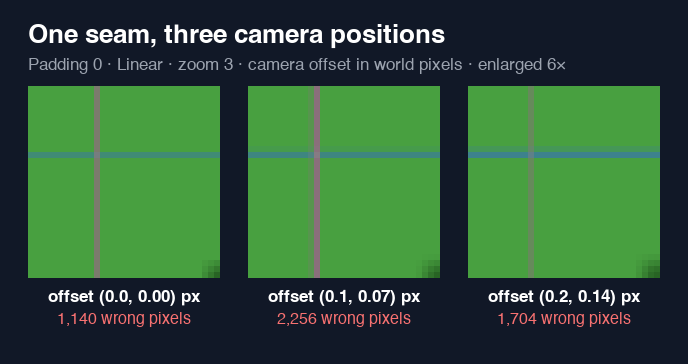
With Nearest filtering, all 120 moving camera shots across the six sheets were clean, including padding 0. Nearest picks one texture pixel for each screen pixel, and in every case we measured, that pixel was inside the frame.
Filter Clip: the fix that needs no new export
An AtlasTexture in Godot 4 has a Filter Clip checkbox. Turned on, Godot keeps the sampling inside the region, so the edge pixel is stretched instead of blended with its neighbor. In our runs it gave zero wrong pixels on all six sheets, including padding 0, at every camera position.
When we ran these tests, SpritePilot's SpriteFrames export wrote plain AtlasTextures with Filter Clip off, as Godot does by default. This test is why we changed it: the export now turns Filter Clip on for every frame, and so does our free Godot Sprite Sheet Importer add-on. If you made a .tres with SpritePilot before November 2026 and use Linear filtering, export it again, or tick Filter Clip on its atlas textures.
Mipmaps: the surprise
Mipmaps are smaller copies of the texture that Godot uses when you zoom out. We imported copies of all six sheets with mipmaps on and drew them with Linear Mipmap filtering at zoom 0.5 and 0.25.
At zoom 0.5 every sheet was clean. At zoom 0.25 the order flipped in a way we did not predict:
| Sheet | Linear Mipmap, zoom 0.25 |
|---|---|
| Padding 0, Extrude 0 | clean (largest change 0) |
| Padding 1, Extrude 0 | clean (largest change 2) |
| Padding 2, Extrude 0 | clean (largest change 3) |
| Padding 0, Extrude 1 | all 84 checked pixels wrong, up to 32 levels, neighbor colors |
| Padding 2, Extrude 1 | all 84 checked pixels darker, up to 10 levels |
| Padding 2, Extrude 2 | clean (largest change 0) |
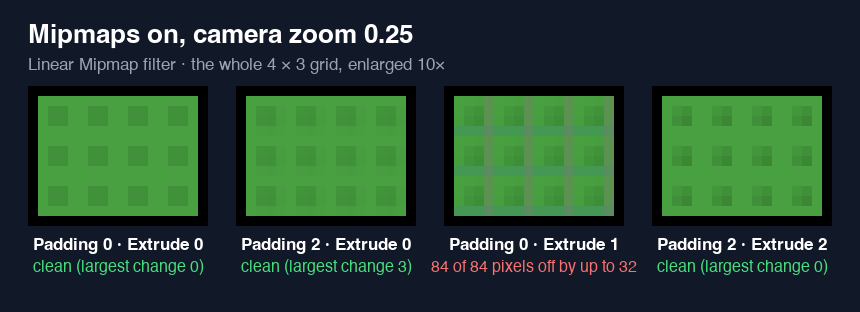
Our best explanation: the sheet with no padding came out clean because its frames sit at x = 0 and x = 16, which line up with the 4 × 4 blocks the quarter size mip level averages. Extrude 1 shifts each frame by one pixel, so those blocks straddle a frame, its copied edge and the next frame's copied edge, and some magenta gets averaged in. Extrude 2 with padding 2 pushed the neighbors far enough away again.
So if your 2D game zooms far out with mipmaps on, one pixel of extrusion is not the safe default it is at full size. Test your own zoom range, or keep mipmaps off; most 2D games never need them.
What we'd do
For pixel art in Godot 4:
- Use Nearest filtering (Project Settings, Rendering, Textures, Canvas Textures, Default Texture Filter). In 414 Nearest captures across the three runs we found no bleeding, with or without padding.
- Leave mipmaps off.
- Export with Extrude 1 anyway. It costs a few pixels and protects you the day a node ends up on Linear by mistake.
For smooth or painted art that needs Linear filtering:
- Export with Extrude 1; padding is optional. Padding without extrude just trades colored lines for dark ones.
- Or turn on Filter Clip on the AtlasTextures, which fixed every full size case we measured on its own.
- If you use mipmaps and zoom out a lot, raise extrude to 2 and check the result at your smallest zoom.
These tests used the same kind of frame a SpriteFrames resource holds: an AtlasTexture pointing into a shared sheet. We did not test Filter Clip together with mipmaps. TileMaps are a separate case, and Godot pads tile atlases for you; Why Lines Appear Between Your Tiles covers that side. To make your own padded and extruded sheet, open Export & Download and set Padding and Extrude before you download.