Free Pixel Font: Wingtip Pixel
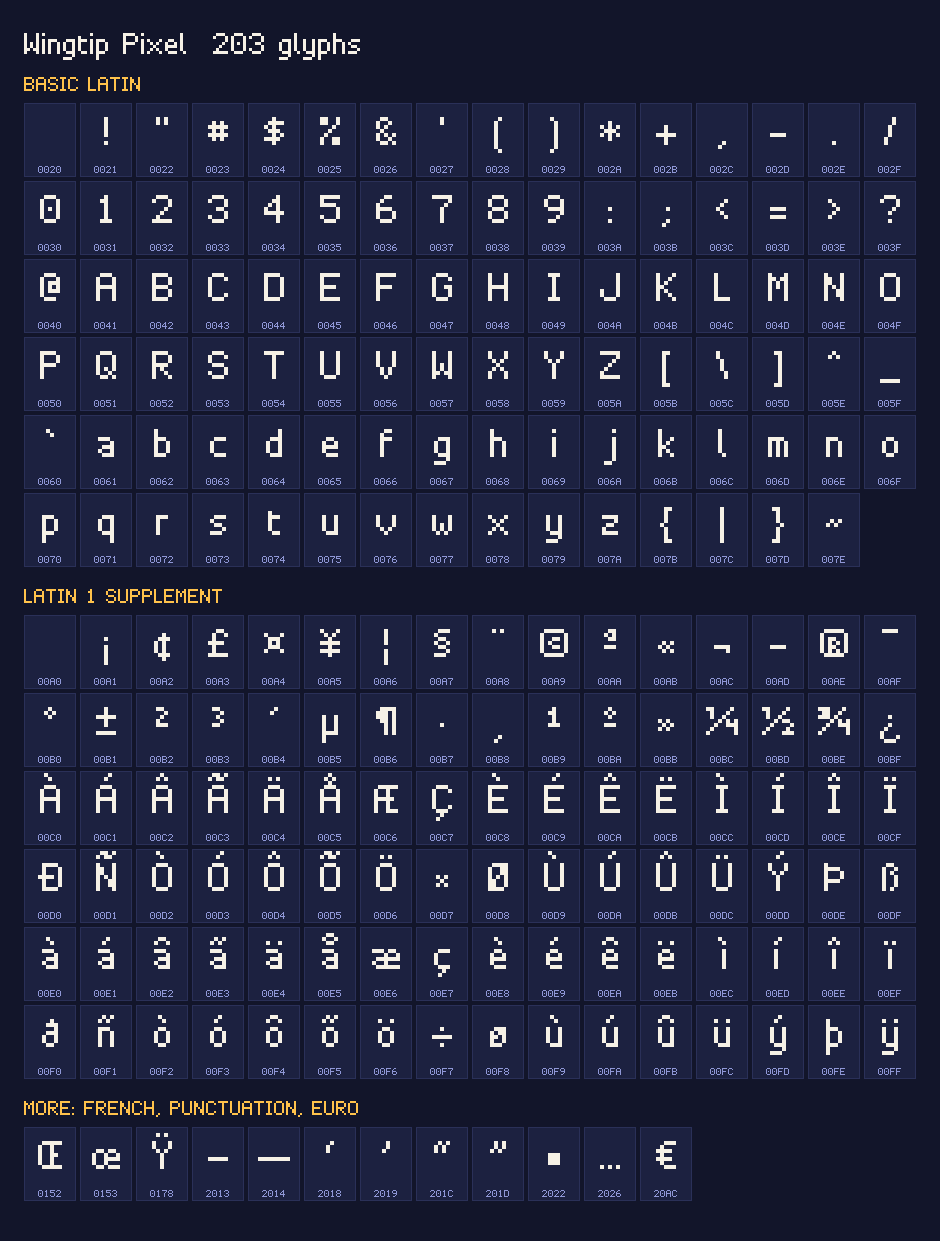
Wingtip Pixel is a free pixel font for game menus, scores and dialogue. It has 203 characters: all of ASCII, the accented letters of Western European languages, the euro sign, curly quotes and the ellipsis. Type below to try it, see it on four game screens, then download it as a TTF for any engine, a WOFF2 for the web or a bitmap font for Godot and Phaser.
Watch how it works
Capitals are 7 pixels tall and lowercase letters 5, with 2 pixel descenders. Letters are proportional, and all ten digits share one width so a changing score stays in place. The font sits on an 8 pixel grid, so it is pixel perfect at 8, 16, 24 and 32 px. It is CC0: use it in any project, commercial or not, with no credit needed.
203 characters · sharp at 8, 16, 24, 32 px · TTF, WOFF2 and BMFont · CC0. Download the font (.zip, 41 KB).
Try the font
Type any text on this page to see it in Wingtip Pixel at 8, 16, 24, 32 px, on a dark or a light background, with font smoothing off the way you would use it on a website.
In a real game
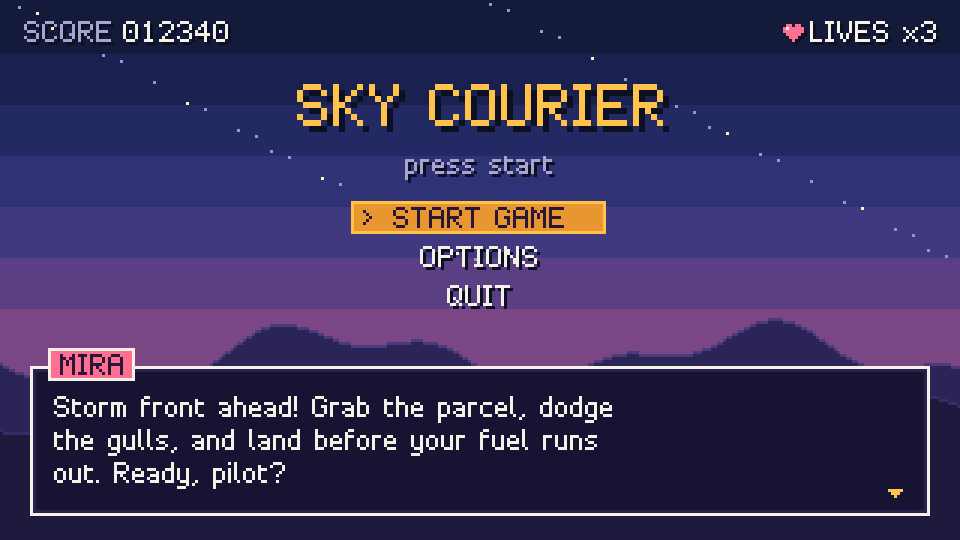
A title menu with a selected item, a gameplay HUD with score, coins and hearts, a dialogue box with a name tag and a shop list, drawn with the bitmap font files over the free pixel art backgrounds.
Every character
Download
- TTF (19 KB): TrueType font for Unity, Godot, apps and desktops
- WOFF2 (4.0 KB): the same font for websites
- BMFont 1x (.fnt) (17 KB): bitmap font at 8 px, text format, for Godot and other engines
- BMFont 1x atlas (.png) (1.6 KB): the glyph image that goes with the 1x .fnt and .xml
- BMFont 2x (.fnt) (18 KB): bitmap font at 16 px
- BMFont 2x atlas (.png) (2.4 KB): the glyph image that goes with the 2x .fnt and .xml
- BMFont 1x (.xml) (23 KB): the 1x data in XML, for Phaser
- BMFont 2x (.xml) (23 KB): the 2x data in XML, for Phaser
- Character map (.png) (25 KB)
- Everything in one ZIP (41 KB): the font files, the character map, a sample screen, a README and the license
How to use it
Unity
- Drop wingtip-pixel.ttf into your Assets folder.
- For legacy Text: select the font and in its import settings set Rendering Mode to Hinted Raster and Font Size to 8 or 16. On your Text components use font sizes 8, 16, 24 or 32.
- For TextMeshPro: open Window > TextMeshPro > Font Asset Creator, choose wingtip-pixel.ttf, set Sampling Point Size to 16, Padding to 2 and Render Mode to RASTER_HINTED. Set Character Set to Unicode Range (Hex) and paste this list, which is exactly the 203 characters in the font (Extended ASCII would leave out €, Œ, the curly quotes and the ellipsis):
20-7E,A0-FF,152-153,178,2013-2014,2018-2019,201C-201D,2022,2026,20AC - Press Generate Font Atlas, then Save. Select the new font asset's atlas texture and check that its Filter Mode is Point. Use font sizes in multiples of 8, and a Pixel Perfect Camera so the game scales by whole numbers.
Godot 4
- Select wingtip-pixel.ttf in the FileSystem dock. In the Import dock set Antialiasing to None, Hinting to None and Subpixel Positioning to Disabled, then press Reimport. Godot imports it as a FontFile.
- Put it on a Label under Theme Overrides > Fonts, and set Theme Overrides > Font Sizes to 8, 16, 24 or 32.
- Prefer a bitmap font? Copy wingtip-pixel.fnt with wingtip-pixel.png next to it into the project and use the .fnt the same way.
- Set Project Settings > Rendering > Textures > Default Texture Filter to Nearest.
Phaser 3
- Load the bitmap font with its atlas in preload, then add text with it:
this.load.bitmapFont('wingtip', 'wingtip-pixel.png', 'wingtip-pixel.xml') this.add.bitmapText(16, 16, 'wingtip', 'SCORE 012340') - For 16 px text use wingtip-pixel-2x.png with wingtip-pixel-2x.xml, or call setScale(2) on the 1x text.
- Set pixelArt: true in the game config so nothing gets smoothed.
- Use the bitmap font rather than the TTF in Phaser. Phaser's Text objects draw on a canvas, and canvas text can't be made fully crisp on every system, while BitmapText copies the glyphs straight from the atlas.
The web
- Copy wingtip-pixel.woff2 to your site and declare it:
@font-face { font-family: 'Wingtip Pixel'; src: url('wingtip-pixel.woff2') format('woff2'); } - Use it at 8, 16, 24 or 32 px and turn smoothing off, so Mac browsers keep the edges hard:
.pixel-text { font-family: 'Wingtip Pixel', monospace; font-size: 16px; line-height: 26px; -webkit-font-smoothing: none; font-smooth: never; } - These settings are for normal web text. Text drawn on a canvas can't be made fully crisp on every system: browsers smooth it and there is no setting to stop that. For canvas games, draw text from the bitmap font (the .fnt or .xml with its .png) instead, and if you scale the canvas up, give it image-rendering: pixelated.
Questions
Can I use Wingtip Pixel in a commercial game?
Yes. The font is released under CC0 1.0, so you can use it in commercial or personal games, apps, videos and websites, embed it in what you ship and sell what you make with it. Credit is welcome but never required.
Which sizes look sharp?
Use 8, 16, 24 or 32 px, or any other multiple of 8. The font sits on an 8 pixel grid, so at those sizes every font pixel lands on whole screen pixels; other sizes look soft or uneven. Turn off smoothing too: Point filtering in Unity, Nearest in Godot, pixelArt in Phaser and font smoothing off in CSS.
Which languages and accents does it support?
English and the Western European languages that fit in the Latin 1 character set, such as French, German, Spanish, Portuguese, Italian, Dutch, Danish, Norwegian, Swedish and Icelandic. It has every letter of Latin 1, plus Œ, œ and Ÿ for French, the euro sign, curly quotes, the ellipsis and the bullet. It has no Greek, Cyrillic, Polish or Czech letters.
Can I change the font?
Yes. CC0 lets you edit the glyphs, add characters, rename it and release your own version under any license. The bitmap atlases are plain PNG images, so you can also open them in any pixel editor and redraw letters for your game.
Free for any use (CC0)
The font and every file here are released under CC0 1.0: use them in any project, commercial or not, change them and share them, without asking and without crediting anyone.
More free game assets
- Free Pixel Art Backgrounds with Parallax Layers
- Free Sound Effects for Games: 150 sounds
- Free Pixel Art Effects: 7 animated sprites
- Free Pixel Art Pickup Sprites: 10 animated sprites
- Free Pixel Art Combat Effects: 9 animated sprites
- Free Pixel Art Spell & Projectile Effects: 9 animated sprites
- Free Animated Pixel Art Tiles & Props: 9 animated sprites
- Free Pixel Art Weather & Ambient Effects: 9 animated sprites
- Free Pixel Art Creature & Enemy Sprites: 8 animated sprites
- Free Pixel Art UI & Feedback Icons: 9 animated sprites
- Free Pixel Art RPG Items: 12 animated sprites