Does Godot's AnimatedSprite2D Keep Uneven Frame Times? We Logged Every Tick
November 17, 2026 · 7 min read
A 600 ms hold played for 500 ms at 60 FPS in Godot 4.7.2. We logged every tick at five frame rates, found the cause, and compared AnimationPlayer.
Open the tool from this article — free, in your browser, no signup.
A long hold is one of the cheapest tricks in sprite animation: a few quick frames, then one pose that stays put for half a second. SpritePilot keeps those uneven times when you export a GIF to Godot, and Godot's SpriteFrames stores a duration for every frame. We wanted to check the last step, so we logged what AnimatedSprite2D actually puts on screen, tick by tick.
It did not hold. In Godot 4.7.2 at 60 FPS, a pose exported as 600 ms stayed on screen for 500 ms in 31 of 32 loops, and the one second loop ran in 916.67 ms. The error depends on the frame rate, it does not average out, and AnimationPlayer playing the same five frames got it right at every frame rate we tried.
The test animation
We drew five numbered 32 × 32 poses with delays of 80, 80, 80, 600 and 160 ms: three quick frames, a long hold, a short exit. One loop is exactly 1,000 ms, which makes errors easy to read. The GIF went through GIF to Sprite Sheet and Send to Export & Download, and we downloaded the SpriteFrames format.
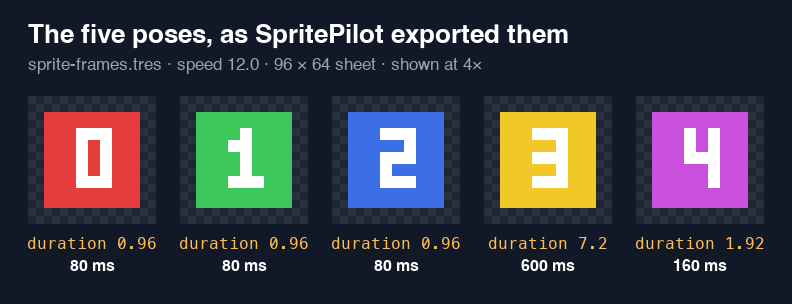
The .tres file sets the animation speed to 12 and gives each frame a relative duration: 0.96, 0.96, 0.96, 7.2 and 1.92. Godot shows a frame for duration ÷ speed seconds, so those are exactly 80, 80, 80, 600 and 160 ms. The export is correct. One practical note: the file refers to the sheet as res://sprite-sheet.png, so keep both files in the project root or point the path at the folder you moved them to.
We also exported Aseprite JSON and turned it into SpriteFrames with our free Godot Sprite Sheet Importer add-on. It produced the same five durations, and in Godot it played identically, tick for tick, to the SpritePilot .tres. Everything below therefore applies to both.
How we measured
Godot 4.7.2, headless, with --fixed-fps so every tick advances time by exactly 1/30, 1/60, 1/75, 1/120 or 1/144 of a second. An AnimatedSprite2D plays the animation, and a second node with a later process_priority writes down which frame is showing at the end of every tick. Each run covers 30 seconds of animation, about 30 loops. A hold is the number of ticks a pose stayed on screen, times the tick length.
We repeated the 60 FPS run without --fixed-fps, on the real clock with a 60 FPS cap. The median loop there was also 916.67 ms, so the fixed rate is not what causes the problem.
Results
| Frame rate | 80 ms poses (average) | 600 ms hold | 160 ms pose | One loop | Behind after 30 s |
|---|---|---|---|---|---|
| 30 FPS | 100.0, 67.4, 82.8 ms | 400 to 600 ms, average 495.8 | 166.7 ms | 914.0 ms | 2,667 ms |
| 60 FPS | 83.3, 83.3, 83.3 ms | 500 to 533 ms, average 501.0 | 166.7 ms | 916.7 ms | 2,583 ms |
| 75 FPS | 80.0, 80.3, 79.8 ms | 559 to 600 ms, average 598.6 | 160.0 ms | 1,000.0 ms | 0 ms |
| 120 FPS | 83.3, 75.3, 83.1 ms | 558 to 592 ms, average 563.4 | 166.7 ms | 970.7 ms | 850 ms |
| 144 FPS | 83.3, 79.8, 80.0 ms | 576 to 583 ms, average 578.2 | 159.7 ms | 980.8 ms | 556 ms |
Some error is expected: a pose can only change on a tick, so at 60 FPS an 80 ms pose has to show for 66.7 or 83.3 ms. What we did not expect is that the error always went the same way. The long hold came up short at every rate except 75 FPS, and the short poses never made up the difference. At 60 FPS the hold was 100 ms short in every loop but the first.
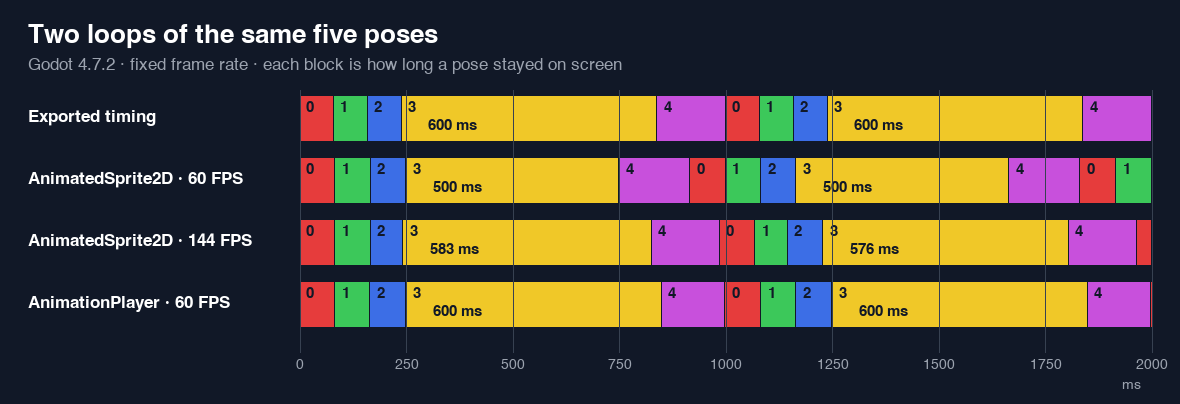
Changing speed_scale kept the problem. At 60 FPS with speed_scale 1.5, the loop should take 666.7 ms and took 595.9 ms; the hold should be 400 ms and averaged 313.3 ms. At speed_scale 0.75, the loop should take 1,333.3 ms and took 1,291.7 ms.
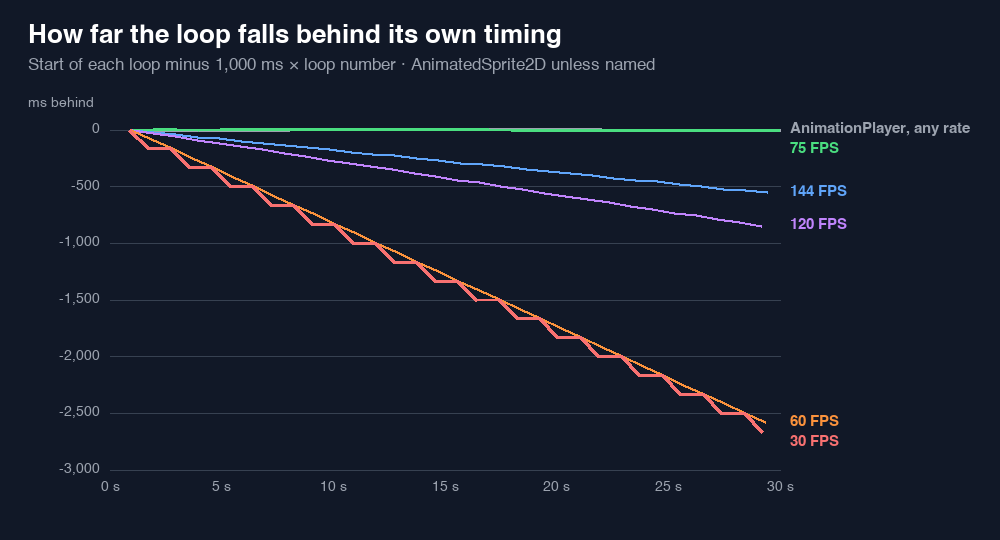
Because the loop runs fast, the animation slowly pulls away from anything timed in real seconds: about 2.6 seconds over 30 seconds at 60 FPS. If a sound or a gameplay event is scheduled from the expected 1,000 ms loop rather than from the animation_looped signal, it will drift out of sync.
Why it happens
We read the AnimatedSprite2D source for 4.7.2 (animated_sprite_2d.cpp). Each tick, the node works out a playback speed that includes the current frame's duration, then spends the tick's time in a loop. When a frame ends partway through a tick, the node moves to the next frame and spends the rest of that tick on it, but at the speed it calculated for the previous frame.
That leftover is never more than one tick, so with even durations it does no harm. With uneven ones it does. Our last 80 ms pose runs 7.5 times faster than the 600 ms hold (7.2 ÷ 0.96), so the few milliseconds left over when it ends count as 7.5 times as much progress through the hold. At 60 FPS that cost the hold six ticks, 100 ms, in every loop after the first. Going the other way, from the slow hold into the 160 ms pose, the leftover counts for less, which is why short poses tended to run long.
At 75 FPS one tick is 13.33 ms, and 80, 600 and 160 are all whole multiples of it. Frames end exactly on a tick, nothing is left over, and the timing comes out right. That explains the flat line, but it is not a fix: your players' screens set the frame rate, not you.
Logging it in your own project
This script prints how long each frame actually stayed up. Attach it to your AnimatedSprite2D as its script and watch the Output panel.
extends AnimatedSprite2D
# Prints how long each frame stayed on screen, using the same delta the sprite plays with.

var _clock := 0.0
var _shown_at := 0.0
var _last_frame := 0

func _ready() -> void:
	frame_changed.connect(_on_frame_changed)

func _process(delta: float) -> void:
	_clock += delta

func _on_frame_changed() -> void:
	print("frame %d held %.1f ms" % [_last_frame, (_clock - _shown_at) * 1000.0])
	_shown_at = _clock
	_last_frame = frame
On our test animation at 60 FPS, after the first loop, it printed frame 3 held 500.0 ms every time. The first line of a run is shorter than the rest because playback starts partway through a tick.
Two ways to get exact holds
AnimationPlayer. We played the same five frames through an AnimationPlayer that sets the sprite's frame property with discrete keys at 0, 80, 160, 240 and 840 ms. The loop measured exactly 1,000.0 ms at 30, 60, 75, 120 and 144 FPS, with no drift after 30 seconds. The hold was 600 ms at every rate except 144 FPS, where the nearest tick made it 604.2 ms. This function builds that animation from the SpriteFrames you already have:
static func frames_to_animation(frames: SpriteFrames, anim: StringName, sprite_path: NodePath) -> Animation:
	var a := Animation.new()
	var track := a.add_track(Animation.TYPE_VALUE)
	a.track_set_path(track, NodePath("%s:frame" % sprite_path))
	a.value_track_set_update_mode(track, Animation.UPDATE_DISCRETE)
	var t := 0.0
	for i in frames.get_frame_count(anim):
		a.track_insert_key(track, t, i)
		t += frames.get_frame_duration(anim, i) / frames.get_animation_speed(anim)
	a.length = t
	a.loop_mode = Animation.LOOP_LINEAR if frames.get_animation_loop(anim) else Animation.LOOP_NONE
	return a
Add the result to an AnimationLibrary on an AnimationPlayer whose root can reach the sprite, and play it there instead of calling play() on the sprite. Leave the AnimatedSprite2D itself stopped. With our logger attached, the hold printed 600.0 ms on every loop.
Equal durations. The bug only bites when neighboring frames have different durations. Every time in our animation is a multiple of 40 ms, so we rebuilt it as 25 frames of duration 1.0 at 25 FPS: the same picture repeated 2, 2, 2, 15 and 4 times. AnimatedSprite2D then measured exactly 1,000.0 ms per loop at all five frame rates, with the hold between 597.2 and 600 ms. In the SpriteFrames panel you can add the same frame several times to do this by hand.
A freeze is a separate issue. We paused the game for 2 seconds in the middle of a run. The largest delta Godot then passed to _process was 140 ms, so about 1.8 seconds of the pause never reached either node. Neither AnimatedSprite2D nor AnimationPlayer catches up after a freeze; they continue from where they were.
What we'd do
- For animations with even timing, AnimatedSprite2D is fine. With all durations equal, it matched the expected loop at every frame rate.
- For uneven holds that matter, such as a blink, an idle pause or an attack wind up, play the frames through an AnimationPlayer, or repeat frames so every duration is the same.
- Keep the timing in the export either way. SpritePilot's SpriteFrames and Aseprite JSON carried 80, 80, 80, 600 and 160 ms into Godot correctly. Godot JSON has no timing field: through the add-on every frame got duration 1.0, and our one second loop played in 416.7 ms.
- If timing matters, log it. Watching an animation by eye will not tell you that a hold lost 100 ms.
For the basics of setting up either node, see AnimatedSprite2D or AnimationPlayer?. For how the delays get from a GIF into the export in the first place, see GIF to Sprite Sheet: Keep Uneven Frame Timing.