PNG, WebP or JPG for Game Sprites? File Size, Quality and Memory Compared
October 14, 2026 · 7 min read
Which format to save sprite sheets in, with measured file sizes for PNG, lossless and lossy WebP and JPG, what JPG does to pixel art, and engine support.
Open the tool from this article — free, in your browser, no signup.
Every sprite export ends with the same question: PNG, WebP or JPG? Pick wrong and you either ship files several times bigger than they need to be, or you smear the pixels you placed by hand. The choice is easy once you know three things: whether a format is lossless, whether it keeps transparency, and the fact that none of them changes how much memory a sprite takes in the game.
To put numbers on it, four sheets were saved in all four encodings with Chrome's built-in encoders (the ones SpritePilot's export uses in Chrome), then decoded again and compared pixel by pixel.
What each format can and can't do
| PNG | JPG | WebP | |
|---|---|---|---|
| Compression | lossless | lossy | lossless or lossy |
| Transparency | yes | no | yes, in both modes |
| Browsers | all | all | all current ones |
Lossless means you get every pixel back exactly as it was. Lossy means the encoder throws away detail it expects you won't notice. That works on photos, where neighboring pixels blend into each other anyway. It fails on pixel art, where every hard edge and every lone pixel is deliberate.
WebP does both. Google's WebP page puts lossless WebP at about 26% smaller than PNG, and notes that lossy WebP can keep transparency too. Browser support is no longer a worry: MDN's image format guide lists WebP in every current browser, with one catch on Macs, where Safari needs version 14 or later running on macOS 11 Big Sur or later. One limit worth knowing for big sheets: a WebP image can't be wider or taller than 16,383 pixels.
What JPG and lossy WebP do to pixel art
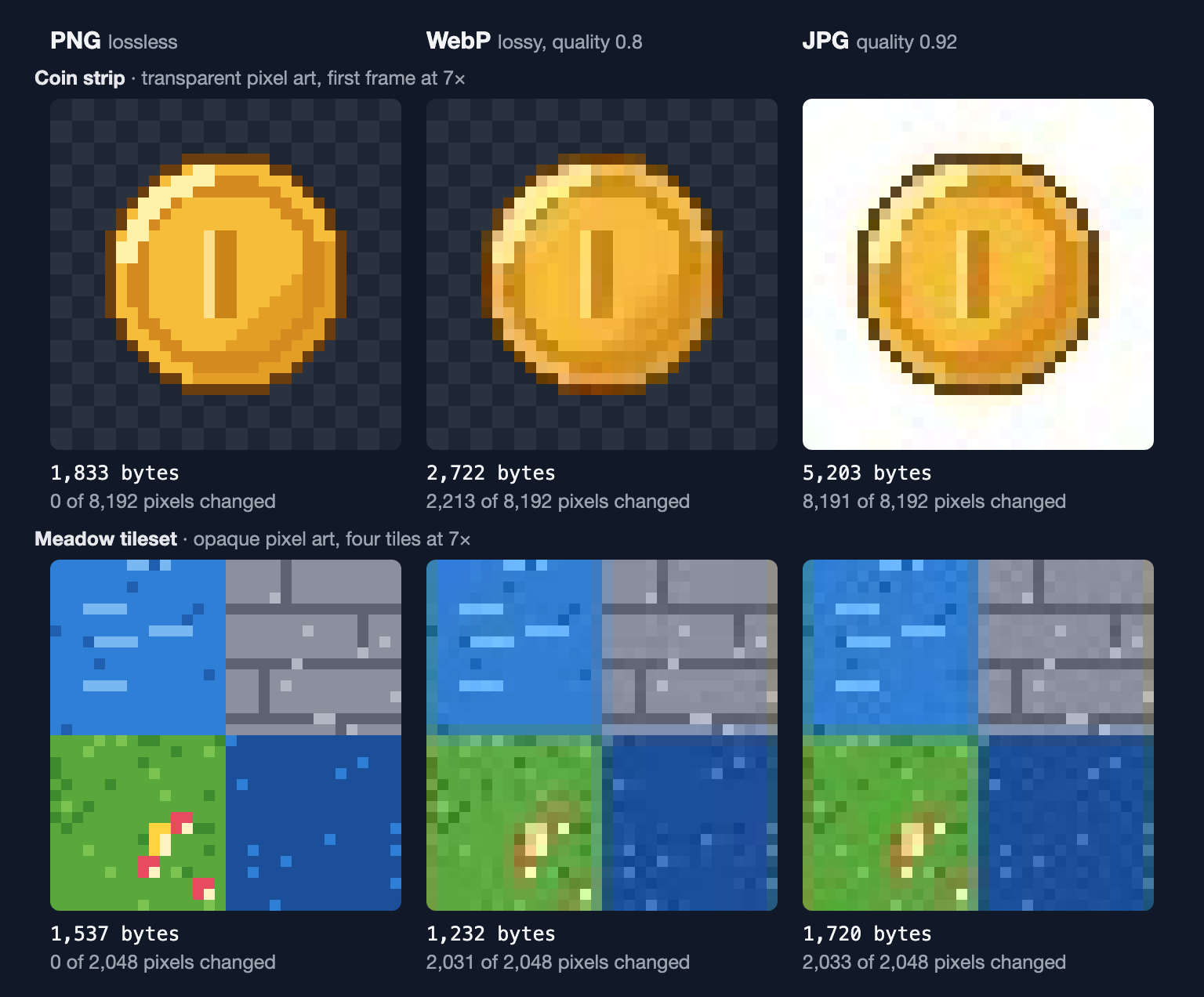
Look at the red and yellow flower on the grass tile. JPG can store color at a lower resolution than brightness, and Chrome's encoder does: at its default quality of 0.92 it keeps one color sample for every 2 × 2 pixels, so a flower drawn with single pixels turns into a brownish smudge. The rest of the compression works on blocks of 8 × 8 pixels and rounds away fine detail inside them, so green leaks into the water along tile edges and the stone lines go soft. Lossy WebP has the same weakness: Google's WebP FAQ says lossy mode works only with 4:2:0 color, the same half-resolution color Chrome's JPG uses.
Transparency is the other problem. JPG has none, so every transparent pixel must become a solid color. SpritePilot fills them with white before it saves a JPG; Chrome's encoder on its own turns them black. Either way, the coin gets a box around it. Lossy WebP kept the coin's transparency intact in the test, but still changed the color of 2,213 of its 8,192 pixels.
And none of that damage buys a smaller file. For the coin, the JPG was 2.8 times the size of the PNG.
Measured file sizes
The four sheets: the 8-frame coin strip, the 8-tile meadow tileset, SpritePilot's bouncing-ball sample, and a 1024 × 512 sheet of a smoothly shaded orb, standing in for painted, high-resolution art. Sizes are in bytes. Lossy WebP used Chrome's default quality of 0.8, and JPG its default of 0.92.



| Sheet | PNG | WebP lossless | WebP lossy | JPG |
|---|---|---|---|---|
| Coin strip, 256 × 32 | 1,833 | 1,274 | 2,722 | 5,203 |
| Meadow tileset, 64 × 32 | 1,537 | 1,130 | 1,232 | 1,720 |
| Ball sample, 256 × 128 | 3,092 | 1,186 | 2,608 | 7,190 |
| Shaded orb, 1024 × 512 | 481,730 | 297,266 | 85,548 | 82,903 |
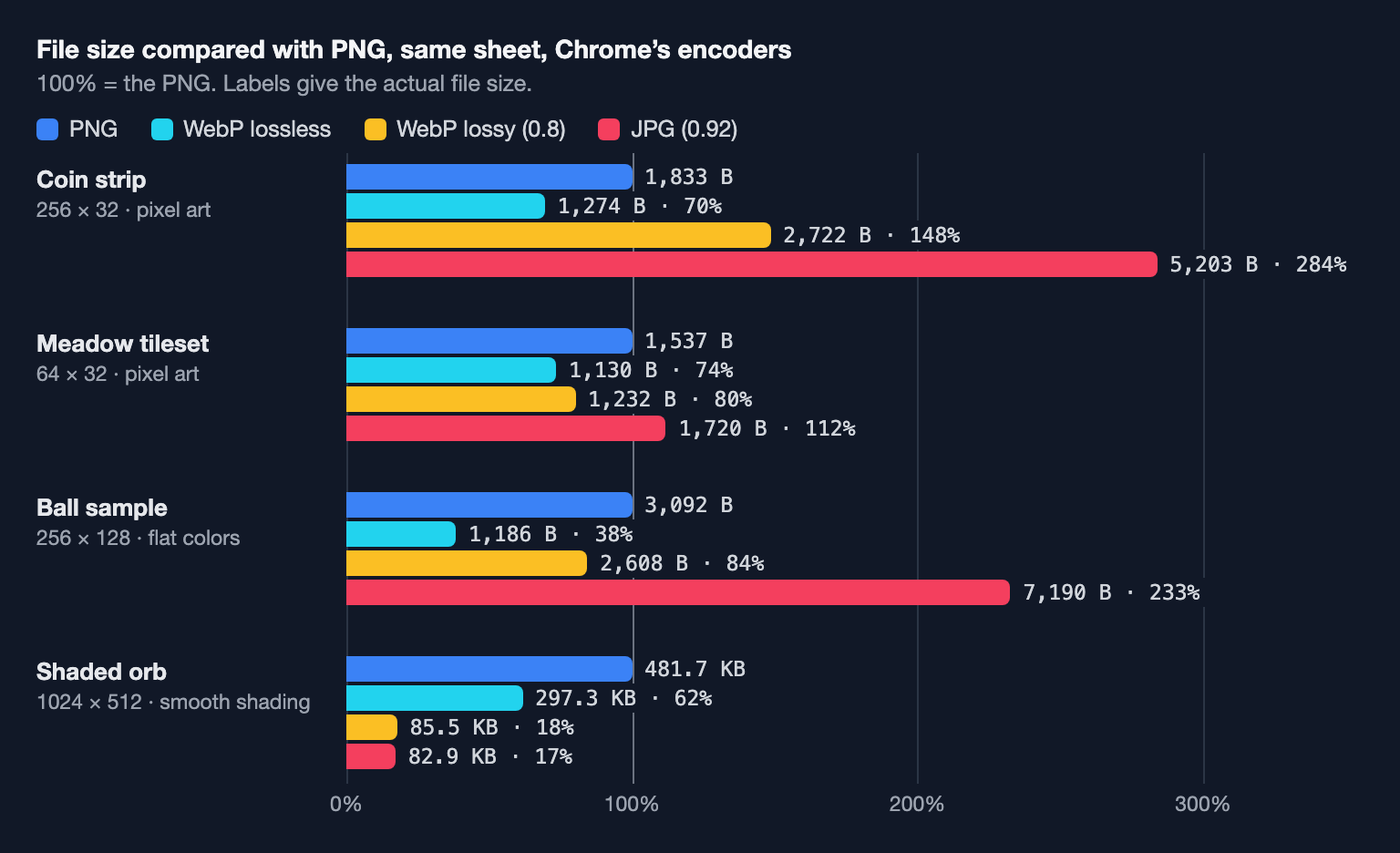
What the numbers say:
- Lossless WebP beat PNG on every sheet, by 26% to 62%, and both gave back every pixel exactly.
- On the three hard-edged sheets, lossy formats don't pay. JPG came out bigger than the PNG every time, up to 2.8 times. Lossy WebP was bigger on the coin and 16–20% smaller on the other two, while changing 2,031 of the tileset's 2,048 pixels. Hard edges and flat colors are what PNG and lossless WebP compress best, and exactly what lossy encoders struggle with.
- On smooth, painted art, lossy formats win big. The orb went from 482 KB as PNG to 86 KB as lossy WebP and 83 KB as JPG, about a sixth. Only the WebP kept the transparent background.
- The encoder matters as much as the format. Chrome's encoders favor speed; Chromium's source code sets its PNG encoder to a low compression level. ImageMagick with its strongest PNG settings saved the coin in 915 bytes, half of Chrome's PNG, and Google's
cwebptool with-z 9made a 558-byte lossless WebP. Going the other way, re-saving the ball sample through Chrome grew it from 918 to 3,092 bytes. All of those files are lossless, so run your final web assets through an optimizer.
In memory, every format is the same size
The file format decides the download and the disk space, not the memory. To draw a sprite, the GPU needs plain pixels, so the image is decoded first, and an uncompressed texture costs 4 bytes per pixel: red, green, blue and alpha.
Memory = width × height × 4 bytes.
- Coin strip: 256 × 32 × 4 = 32,768 bytes, for a file of 1,274 to 5,203 bytes.
- Shaded orb: 1024 × 512 × 4 = 2,097,152 bytes (2 MiB), whether it arrived as an 83 KB JPG or a 482 KB PNG.
The engines say the same. Unity's manual explains that GPUs don't use formats like JPEG or PNG at runtime; when you import a texture, the Editor picks a GPU format for each build platform. Godot's import documentation says of its Lossy mode: "Video memory usage isn't decreased by this mode." Texture memory only goes down with a smaller sheet or a GPU format that uses fewer bits per pixel, and those formats usually spoil pixel art. How Big Can a Sprite Sheet Be? has the memory math for whole atlases.
Which formats your engine accepts
- Unity 6 imports BMP, EXR, GIF, HDR, IFF, JPG, PICT, PNG, PSD, TGA and TIFF. WebP isn't on the list, so give Unity PNGs. Unity converts every texture to its own GPU format anyway, so a PNG source costs nothing in the game, while a JPG source would bring its artifacts along.
- Godot 4 imports PNG, JPEG and WebP, among others. With the default Lossless compression, which the Godot docs recommend for pixel art, the imported texture is stored as lossless WebP or PNG whatever you started from. PNG and WebP both work.
- Phaser loads images through the browser: its loader turns each downloaded file into a regular browser image. So it reads anything the browser can display, WebP included. The same goes for CSS and canvas animation.
For engines that re-encode on import, use PNG and stop worrying. For games that run in a browser, the file you ship is the file players download, and lossless WebP is the smaller choice.
What SpritePilot's export writes
Export & Download offers all three formats for the sheet and for the ZIP of separate sprites:
- PNG comes from your browser's encoder: lossless, though not the smallest possible file.
- WebP is saved at quality 1, which Chrome and other Chromium-based browsers encode as lossless WebP. In the test, every exported pixel came back identical. If your browser can't write WebP from a canvas (MDN's compatibility data lists Safari among them), the WebP button is disabled.
- JPG gets a white background where the sprites were transparent, then the browser's default quality: 0.92 in Chrome.
The other tools, including the Sheet Maker, the GIF and video converters and the Pixel Art Editor, save their sheets as PNG. For what each metadata file contains, see Sprite Sheet Export Formats Explained.
In short
- Pixel art, any engine: PNG. For the web, lossless WebP is smaller, by 26–62% on these sheets.
- Unity: PNG; it can't import WebP and re-encodes everything anyway.
- Large painted sprites on the web: lossy WebP, checked at 100% zoom. JPG only if nothing in the sheet is transparent.
- Never JPG for pixel art: bigger files, smeared colors, no transparency.
- Optimize final files: a good encoder halved some of these PNGs without changing a pixel.
- Memory is width × height × 4 bytes no matter which format the sheet came from.