How Big Can a Sprite Sheet Be? Texture Size Limits, Memory and Power of Two
October 14, 2026 · 6 min read
Maximum texture sizes on real devices, how much memory a sprite sheet takes, when to split it, and when power-of-two sizes still matter in WebGL, Unity and Godot.
Open the tool from this article — free, in your browser, no signup.
Your sprite sheet looks perfect on your own computer, then turns into a black box on a phone, or the engine quietly shrinks it and your pixel art goes soft. Three limits decide how big a sheet can be: the largest texture the graphics chip accepts, the memory the sheet takes once it's loaded, and, in a few remaining cases, the old power-of-two rule. Here is each one in numbers, and how to size and split sheets so they work everywhere you ship.
The hard limit: maximum texture size
Every GPU has a largest texture it will accept, measured as the maximum width or height in pixels. WebGL reports it as MAX_TEXTURE_SIZE. Go one pixel over and the texture simply isn't created. In a Chromium test, uploading a texture one pixel wider than the limit failed with an INVALID_VALUE error, and the sprite drawn with it came out solid black.
How big is the limit on players' devices? web3dsurvey.com collects WebGL capabilities from visitors' browsers. Its WebGL 2 figures, checked in October 2026:
| Limit of at least | All reports | Android | iOS | Windows | macOS |
|---|---|---|---|---|---|
| 4096 | 100% | 100% | 100% | 100% | 100% |
| 8192 | 97% | 76% | 100% | 100% | 100% |
| 16384 | 85% | 3% | 98% | 97% | 94% |
So:
- 4096 × 4096 works everywhere. MDN's WebGL best practices lists 4096 among the limits you can count on, and Godot's import documentation warns that mobile and web platforms usually can't display textures larger than 4096 × 4096.
- 8192 is safe on Windows, Mac and iOS, but about one Android device in four can't load it.
- 16384 rules out Android. Only 3% of Android reports reach it, against 94–98% on iOS, Windows and macOS.
Native engines have their own ceilings. Unity's texture importer goes up to 16384, and its manual lists the maximum per class of GPU: 4096 for OpenGL ES 3.0 devices, 8192 for OpenGL ES 3.1 and 16384 for desktop GPUs from the DirectX 11 era on. Unity also scales any texture larger than the importer's Max Size setting down at import time, so a 4096 sheet imported with Max Size 2048 loses half its resolution, and pixel art comes out blurred. Godot's Size Limit import option does the same on purpose, which is one way to make a sheet fit a phone.
To see the limit of the device in front of you, paste this into the browser's console:
const canvas = document.createElement('canvas')
const gl = canvas.getContext('webgl2') || canvas.getContext('webgl')
console.log(gl.getParameter(gl.MAX_TEXTURE_SIZE))
Memory: width × height × 4 bytes, plus a third for mipmaps
A sheet that fits the limit can still be too heavy. Once loaded, an uncompressed texture costs 4 bytes per pixel (red, green, blue and alpha), whatever file format it came from; PNG, WebP or JPG for Game Sprites? shows why. Memory grows with the square of the side, so doubling the width and height of a sheet multiplies its memory by four:
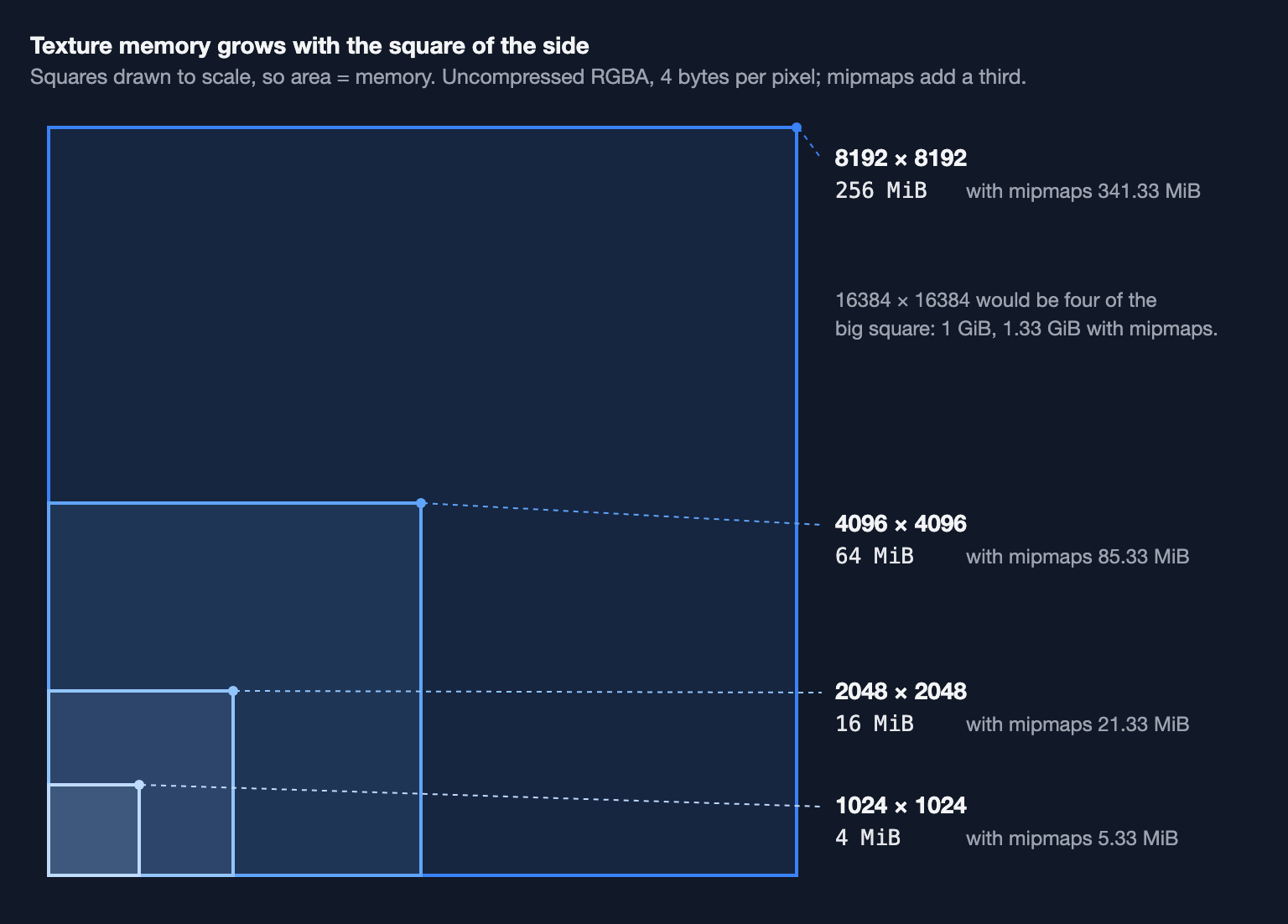
| Sheet | Memory | With mipmaps | Compressed, 8 bits per pixel |
|---|---|---|---|
| 1024 × 1024 | 4 MiB | 5.33 MiB | 1 MiB |
| 2048 × 2048 | 16 MiB | 21.33 MiB | 4 MiB |
| 4096 × 4096 | 64 MiB | 85.33 MiB | 16 MiB |
| 8192 × 8192 | 256 MiB | 341.33 MiB | 64 MiB |
The arithmetic for 2048: 2048 × 2048 × 4 = 16,777,216 bytes, which is 16 MiB.
Mipmaps are pre-shrunk copies of the texture at half, a quarter, an eighth of the size, and so on, used when the texture is drawn small. Each level has a quarter of the pixels of the one before, so the whole chain adds 1/4 + 1/16 + 1/64 + … = 1/3 to the memory. Godot's documentation lists the same 21.33 MiB for a 2048 × 2048 RGBA texture with mipmaps. Most 2D games don't need them: Godot's default import settings for 2D leave them off, and they soften pixel art.
GPU compression formats such as DXT (also called BC), ETC2 and ASTC store 8 bits per pixel or fewer instead of 32, according to Unity's table of formats: a quarter of the memory at most. They are lossy and work in small blocks of pixels, though, and Godot's documentation recommends keeping VRAM compression off for pixel art. One more multiplier to watch: Unity's Read/Write import option keeps an extra copy for scripts, which the manual says doubles the memory the texture needs.
When to split one sheet into several
Sheets exist to save work for the GPU. Unity's manual puts it plainly: it only needs one draw call for all the sprites in a sprite atlas. Every time the game draws from a different texture, it has to switch. So split along the lines of what is drawn together:
- Split when a sheet passes your platform's limit. For web and mobile, that means 4096.
- Split by when things are needed. A level's tiles and enemies don't need to sit in memory while another level plays.
- Keep each animation on one texture, and keep sprites that appear on screen together on the same one.
Big frames fill sheets quickly. A 1920 × 1080 video frame fits 4 across and 7 down on an 8192 × 8192 sheet, so that sheet holds 28 frames. A 4096 sheet holds 6.
Power of two: when it still matters
Power-of-two sizes are 256, 512, 1024, 2048, 4096 and so on. Older graphics hardware required them. Today it depends on where the sheet runs:
- WebGL 1 can't use mipmaps or repeating (tiling) wrap modes on textures whose sides aren't powers of two; MDN says they must use
CLAMP_TO_EDGE. In the Chromium test, a 96 × 64 texture set to repeat drew solid black andgenerateMipmapfailed, while 128 × 64 worked. A sprite sheet drawn the usual way, clamped and without mipmaps, works at any size. - WebGL 2 lifts the restriction: Khronos listed non-power-of-two textures among WebGL 2.0's additions, and the same 96 × 64 texture repeated and mipmapped without errors.
- Unity accepts other sizes, but its manual notes that they "generally take slightly more memory and might be slower for the GPU to sample". On a platform without support, Unity scales and pads the texture up to the next power of two, and the Non Power of 2 import option does that on purpose. PVRTC compression on iOS also needs square textures: Unity's own example turns a 257 × 511 texture into 512 × 512.
- Godot recommends power-of-two sizes but doesn't require them, and textures don't have to be square.
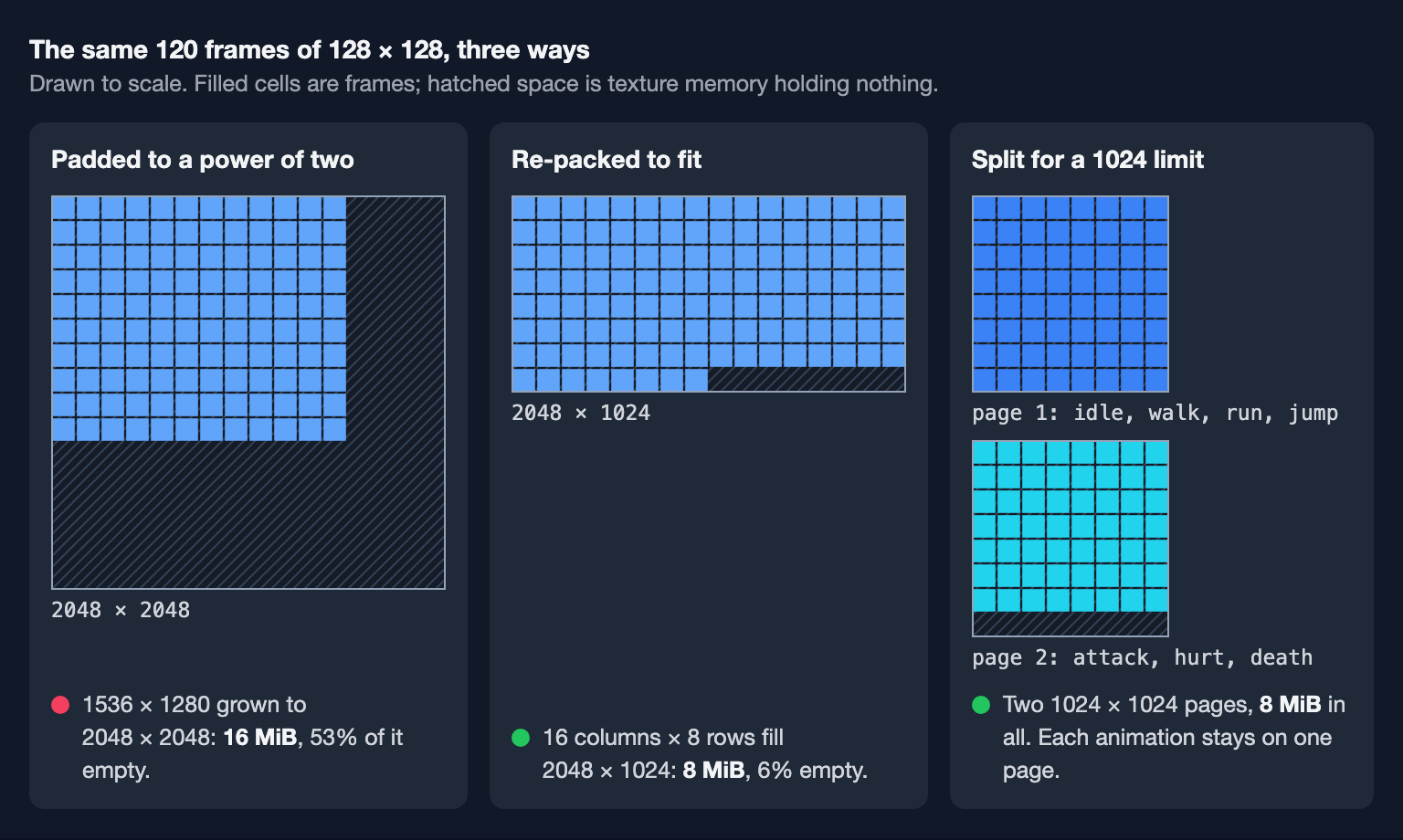
Where you do need a power of two, don't pad blindly. The figure above shows a 1536 × 1280 sheet padded to 2048 × 2048: 16 MiB, more than half of it empty. The same 120 frames re-packed 16 across fill 2048 × 1024 almost exactly, for 8 MiB.
What SpritePilot does with sheet sizes
SpritePilot's Sheet Maker packs separate images into one sheet. Its Max Width and Max Height go from 256 to 8192 pixels, starting at 2048, and the sheet comes out as the tight box around the packed images. It doesn't pad to a power of two. When the images don't fit, it tells you the size that would hold them all, or, if even 8192 × 8192 is too small, that they need to be split over several sheets.
The GIF to Sprite Sheet and Video to Sprite Sheet converters also stop at 8192 pixels a side. Over that, the download is disabled and a warning says which column counts would fit. For video, the Auto frame size picks the largest frames that still fit one 8192 sheet. Treat 8192 as SpritePilot's ceiling, not a target: for Android and the web, set Max Width and Max Height to 4096 or less. To fit more frames into the same sheet, see trimming transparent pixels.
A sizing checklist
- Web and mobile: keep each sheet at 4096 × 4096 or less. Windows and Mac only: 8192 is safe.
- Memory = width × height × 4 bytes. Mipmaps add a third; most 2D games can leave them off.
- Split by use: one animation per texture, things on screen together on one sheet, levels loaded separately.
- Powers of two matter for WebGL 1 with mipmaps or tiling, for PVRTC, and on platforms without support. Re-pack to fill one rather than padding.
- Check a device's real limit with
gl.getParameter(gl.MAX_TEXTURE_SIZE).