Free Pixel Font for Games: Wingtip Pixel, TTF and Bitmap
November 13, 2026 · 8 min read
Wingtip Pixel is a free CC0 pixel font with 203 characters in TTF, WOFF2 and BMFont, plus how to keep it sharp in Godot 4, Unity, Phaser and CSS.
SpritePilot now has a free pixel font for games: Wingtip Pixel. It covers 203 characters, including the accented letters of Western European languages, the euro sign and curly quotes, and comes as a TTF for engines, a WOFF2 for websites and a bitmap font (BMFont) for Godot, Phaser and anything else that reads .fnt files. It is released under CC0, so you can use it in any game, commercial or not, without giving credit. Below is what's in the download, the one rule that keeps a pixel font sharp, and short setups for Godot 4, Unity, Phaser 3 and CSS.
What's in the font
Wingtip Pixel is built for the text a game actually shows: menus, scores, timers, item lists and dialogue. Capitals are 7 pixels tall and lowercase letters 5, with 2 pixel descenders. Letters are proportional, so dialogue reads naturally, but all ten digits share one width. That matters more than it sounds: when a score ticks from 011111 to 088888, nothing shifts sideways.
The 203 characters are all of printable ASCII, the whole Latin 1 Supplement (é, ß, ñ, ø, Å, ¿ and the rest, plus © £ ½), Œ œ Ÿ for French, curly quotes, the en and em dash, the ellipsis, the bullet and €. That covers English, French, German, Spanish, Portuguese, Italian, Dutch and the Nordic languages. There is no Greek, Cyrillic, Polish or Czech.
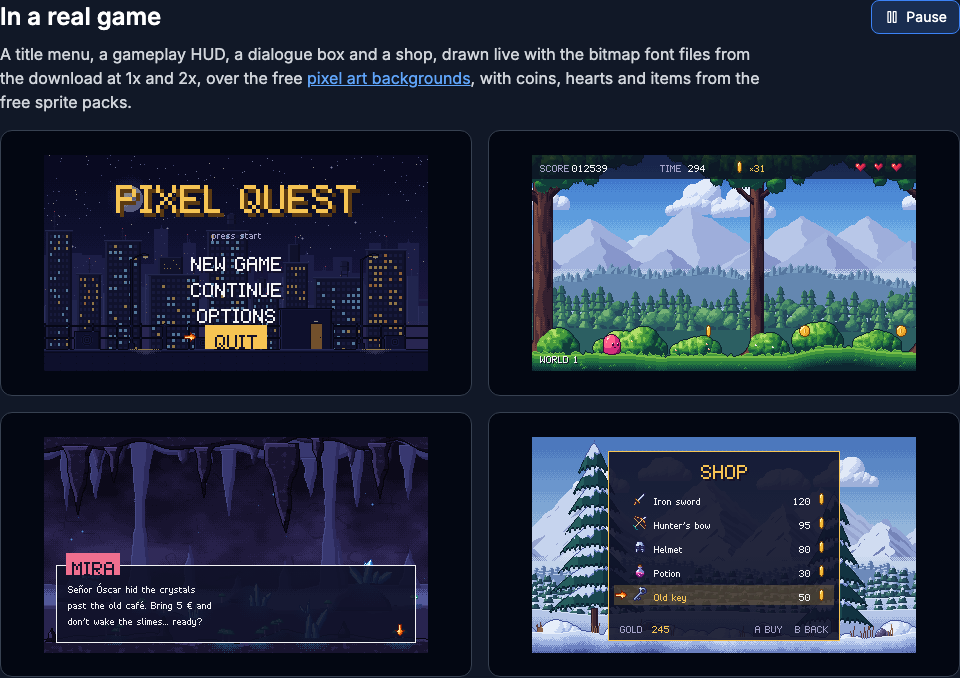
The download has these files:
| File | Use it for |
|---|---|
wingtip-pixel.ttf |
Unity, Godot, desktop apps |
wingtip-pixel.woff2 |
Websites |
wingtip-pixel.fnt + .png |
Bitmap font at 8 px (text BMFont, 128 by 128 atlas) |
wingtip-pixel-2x.fnt + .png |
The same at 16 px (256 by 256 atlas) |
wingtip-pixel.xml, wingtip-pixel-2x.xml |
The bitmap data in BMFont's XML format, for Phaser |
The ZIP on the page also has a chart of every character with its code point, a sample screen and a README with the steps below.
The rule: sizes in multiples of 8
The font sits on an 8 pixel grid: at 8 px, one font pixel is one screen pixel; at 16 px it is a 2 by 2 square, at 24 px 3 by 3, at 32 px 4 by 4. At those sizes every edge lands exactly on a screen pixel. At any other size the font pixels fall between screen pixels and the engine has to round them, which makes some strokes thicker than others or smears them into gray.
The second half of the rule is to turn smoothing off wherever it happens: in the font importer, in the texture filter, and in the browser. Here is the same score rendered four ways, enlarged 3x so you can see the screen pixels:
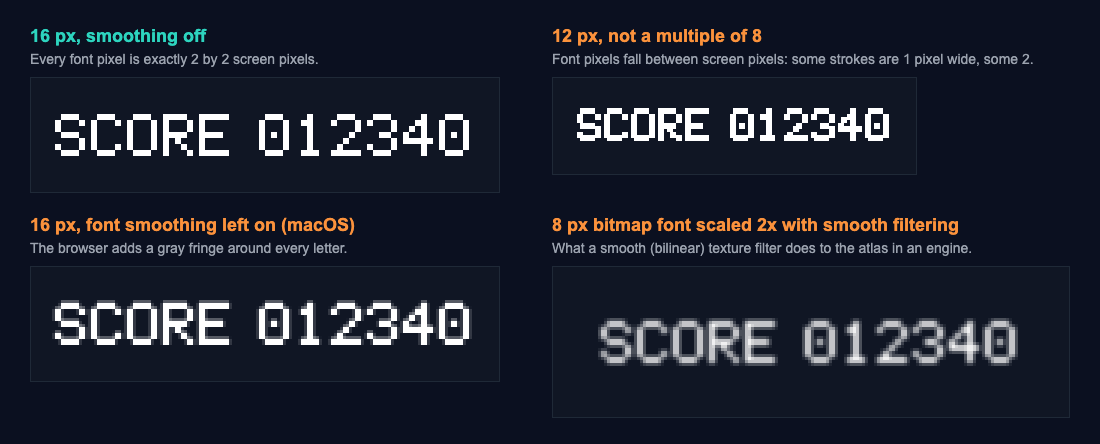
The numbers behind the picture: at 16 px with smoothing off, the text was 664 white pixels and not one in between. With the browser's font smoothing left on, the same 664 white pixels came with 658 gray ones around them. At 12 px there was no gray, but the letters are uneven. The bitmap scaled with a smooth filter had no pure white pixel left at all. For more on why whole number scales matter, see how to scale pixel art without blurring it.
Godot 4
You have two good options.
The TTF. Copy wingtip-pixel.ttf into the project and select it in the FileSystem dock. In the Import dock set Antialiasing to None, Hinting to None and Subpixel Positioning to Disabled, then press Reimport. The Godot class reference describes the disabled antialiasing as the one most suited to pixel art fonts, and the fonts tutorial says pixel art fonts should have subpixel positioning disabled. Put the font on a Label under Theme Overrides > Fonts, and set the size under Theme Overrides > Font Sizes to 8, 16, 24 or 32. The same tutorial says it plainly: the font size must be an integer multiple of the font's design size, which for Wingtip Pixel is 8.
The bitmap font. Copy wingtip-pixel.fnt with wingtip-pixel.png next to it. Godot imports the .fnt as a font you can drag onto the same Theme Overrides slot. In its Import dock, set Scaling Mode to Enabled (Integer): Godot then scales the 8 px bitmap only to whole multiples, which its documentation calls the recommended option for pixel art fonts. The default, Enabled (Fractional), allows sizes like 12 that blur.
Either way, set Project Settings > Rendering > Textures > Canvas Textures > Default Texture Filter to Nearest, as the fonts tutorial recommends for pixel art. We checked these settings against the Godot 4 documentation (the fonts tutorial and the importer class references); we did not run them in the editor.
Unity
For TextMeshPro, open Window > TextMeshPro > Font Asset Creator and set:
- Source Font File:
wingtip-pixel.ttf - Sampling Point Size: Custom Size, 16
- Padding: 2
- Atlas Resolution: 512 by 512
- Render Mode: RASTER_HINTED, which renders without antialiasing and lines the glyphs up with the atlas pixels
- Character Set: Unicode Range (Hex), with this list, which is exactly the 203 characters in the font:
20-7E,A0-FF,152-153,178,2013-2014,2018-2019,201C-201D,2022,2026,20ACThe preset called Extended ASCII stops at ÿ, so it would leave out €, Œ, the curly quotes and the ellipsis. Press Generate Font Atlas, then Save. Select the atlas texture under the new font asset and check that its Filter Mode says Point. The Font Asset Creator that ships with Unity 6 (TextMeshPro inside uGUI 2.0) sets Point on raster atlases by itself, but set it if yours says Bilinear. Use font sizes that are multiples of 8, and keep the canvas at a whole number scale: a Canvas Scaler on Constant Pixel Size with a Scale Factor of 1, 2 or 3 does it.
For the legacy Text component instead, select the TTF and in its import settings set Rendering Mode to Hinted Raster (Unity's reference calls it hinted rendering without antialiasing, the crispest option) and Font Size to 8 or 16.
For the game around the text, a Pixel Perfect Camera keeps the whole view at whole number scales. Its sprite setup is in Unity sprite sheet animation. These Unity steps were checked against the Unity 6 manual, the scripting reference and the Font Asset Creator's source code in Unity 6.3; we did not create the font asset in the editor.
Phaser 3
Phaser draws a bitmap font straight from its atlas, which is the sharpest way to show this font on the web. Load the XML version with its PNG:
class Hud extends Phaser.Scene {
  preload() {
    this.load.bitmapFont('wingtip', 'fonts/wingtip-pixel.png', 'fonts/wingtip-pixel.xml')
    this.load.bitmapFont('wingtip-2x', 'fonts/wingtip-pixel-2x.png', 'fonts/wingtip-pixel-2x.xml')
  }

  create() {
    this.score = 0
    this.scoreText = this.add.bitmapText(8, 8, 'wingtip', 'SCORE 000000')
    this.add.bitmapText(8, 24, 'wingtip-2x', 'Café, Größe, 5 €')
    this.add.bitmapText(8, 48, 'wingtip', 'GAME OVER').setScale(2).setTint(0xffd166)
  }

  addPoints(n) {
    this.score += n
    this.scoreText.setText('SCORE ' + String(this.score).padStart(6, '0'))
  }
}

new Phaser.Game({
  type: Phaser.AUTO,
  width: 320,
  height: 180,
  pixelArt: true,
  scale: { zoom: Phaser.Scale.MAX_ZOOM },
  scene: Hud,
})
pixelArt: true turns off antialiasing and rounds positions to whole pixels, and Phaser.Scale.MAX_ZOOM enlarges the 320 by 180 game by the largest whole number that fits. For 16 px text you can load the 2x files or scale the 1x text by 2; both give the same result.
We ran this scene with Phaser 3.90 in Chromium (with its Canvas renderer and with WebGL) and in WebKit, and read the game's pixels back. Every frame contained only the background, white and the tint color, with no in between shades. The 1x text at scale 2 and the 2x font matched pixel for pixel. "SCORE 000000", "SCORE 111111" and "SCORE 888888" all measured 70 pixels wide, and addPoints(1250) printed SCORE 001250. Two things we learned on the way:
MAX_ZOOMmeasures the element the game sits in, which is the page body by default. Our first run left the body without a height and the zoom stayed at 1. Give it one, for examplehtml, body { height: 100% }, and the zoom came out at 4 in a 1280 by 720 window.- The tint only showed with the WebGL renderer. Under the Canvas renderer, GAME OVER stayed white.
Loading sprites for the same scene is covered in Phaser sprite sheets and atlases.
CSS and the web
Declare the WOFF2 with the TTF as a fallback, use a multiple of 8, and turn font smoothing off:
@font-face {
  font-family: 'Wingtip Pixel';
  src: url('wingtip-pixel.woff2') format('woff2'),
       url('wingtip-pixel.ttf') format('truetype');
}

.pixel-text {
  font-family: 'Wingtip Pixel', monospace;
  font-size: 16px;               /* 8, 16, 24 or 32 */
  line-height: 26px;
  -webkit-font-smoothing: none;
  font-smooth: never;
}
The line height is twice the bitmap font's 13 at 1x, which leaves room for accented capitals; 20px is enough if you only use plain ASCII at 16 px. According to MDN, -webkit-font-smoothing only works on macOS and font-smooth is not standard, so on other systems the multiple of 8 is what keeps the text clean.
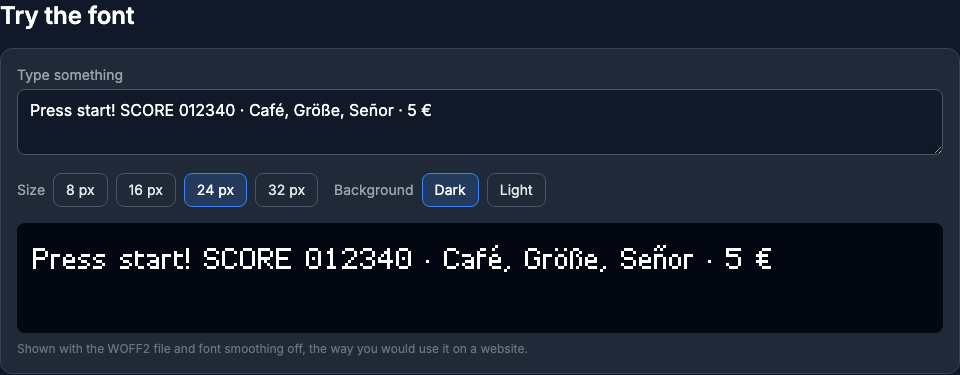
One limit worth knowing: text drawn on a <canvas> with fillText can't have its smoothing turned off. In our test on macOS, Chromium and WebKit both drew 16 px canvas text with the same gray fringe as the smoothed text above, whole pixel position or not. Phaser's regular Text objects draw through a canvas the same way, so for canvas games use the bitmap font as in the Phaser section, and keep the CSS route for HTML menus and pages.
Use it anywhere
Wingtip Pixel is CC0 1.0: use it in commercial or personal games, apps, videos and websites, embed it in what you ship, change the letters, add characters and release your own version under any license, all without asking and without credit. A link to SpritePilot is always welcome, never required.
Try the font and download it. It pairs with the parallax backgrounds and the sound effects, and the rest of the free game assets have sprites, tiles and effects under the same license.