Two Free Game Kits: Playable Demos With Every Sprite and Sound
October 27, 2026 · 7 min read
Play Neon Arena and Neon Runner, then download their free neon sprites, atlases, SVG sources, sound effects and music. Includes a tested Phaser example.
Open the tool from this article — free, in your browser, no signup.
SpritePilot's new Game Kits section has two free downloads: Neon Arena, a survival shooter kit, and Neon Runner, a platformer kit. Play each browser demo directly on its page before downloading every sprite, sound effect and music track for your own games, including commercial releases. Each ZIP includes two artwork sizes, atlases, SVG sources, animation previews, WAV/OGG/MP3 sound effects and three original music tracks. No credit is required; the license allows use in finished projects but prohibits redistributing the assets as a pack.
The demos let you judge the assets together: how an enemy reads against the background, whether a hit effect is distinct from a pickup, and how a sound fits the action. The download is an asset kit, not the game's source project. You bring your own movement, collision and game rules.
Neon Arena: ships, waves and glowing pickups
Play Neon Arena and download its kit. Steer a ship, aim through enemy waves and collect power-ups. The art covers idle, thrust, damage and death states for the player, enemy animations, projectiles, explosions, shields and pickups, plus the interface and arena background.
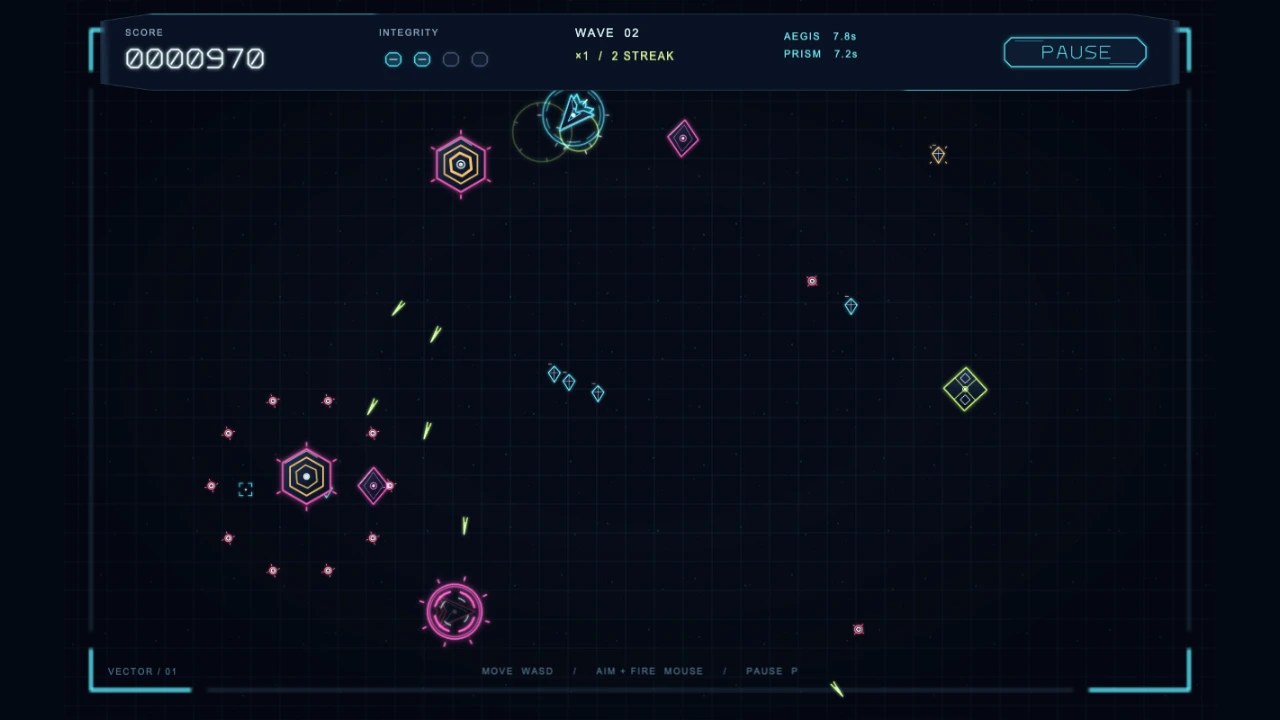
The ZIP is 20.91 MB and contains 49 art entries, totaling 531 frames at each resolution, with 31 sound families and 48 recordings, plus three music tracks: a 74-second menu loop, a 105-second battle loop and a 5-second game-over sting. An entry can be an animation or static artwork; it does not mean a different character. For example, the player's idle and thrust strips are separate entries.
Most gameplay frames are 128 × 128 px at 1× and 256 × 256 px at 2×. Interface dimensions vary: health pips are 64 × 64 / 128 × 128, digits are 40 × 48 / 80 × 96, and buttons are 256 × 64 / 512 × 128. Use the dimensions for the specific entry in pack.json, rather than cutting the whole kit into one assumed cell size.
Arena's atlas is a TexturePacker multi-atlas: atlas-1x.json or atlas-2x.json points to the existing strip PNGs as separate pages. There is no single combined atlas PNG in this ZIP. Keep the folders intact and use Phaser's load.multiatlas, with the kit folder as the image base. A loader expecting one PNG/JSON pair needs a different import path.
Neon Runner: a platformer with terrain and maps
Play Neon Runner and download its kit. Jump, dash, climb and collect shards across two neon districts; the second district's exit needs a key. This kit adds terrain, ladders, hazards, checkpoints and gates to the character and effect animations.
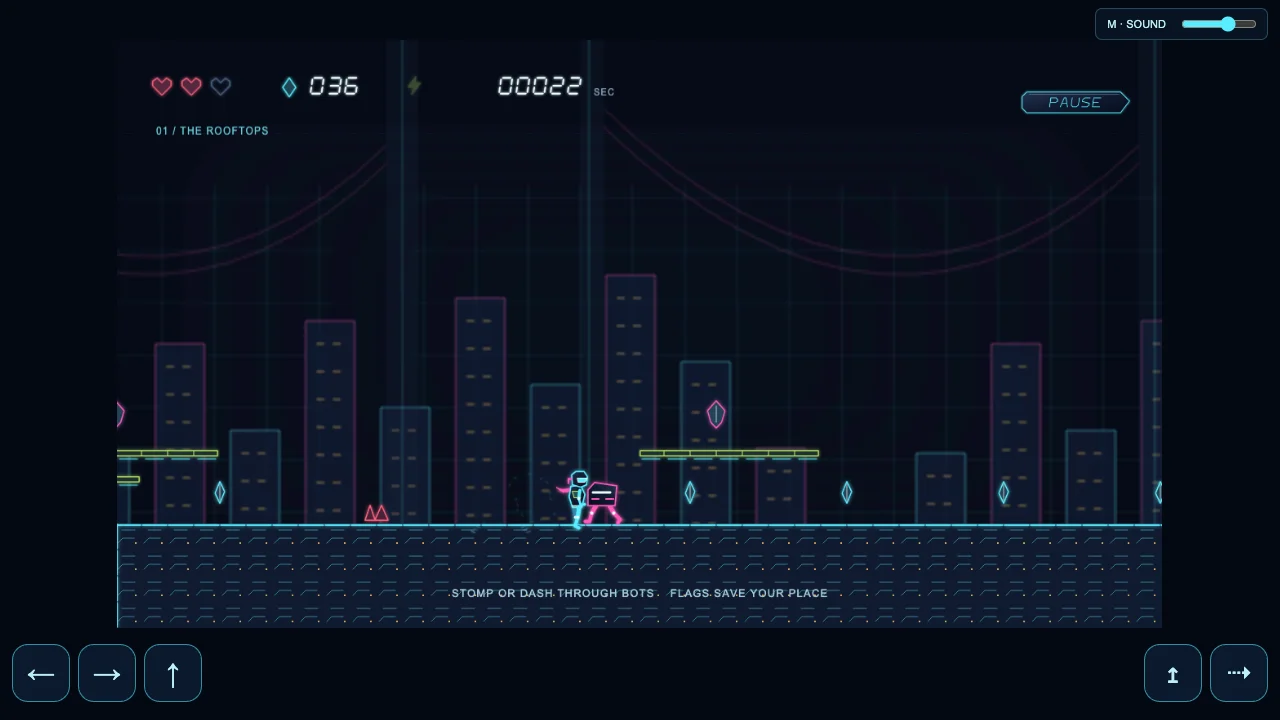
The ZIP is 20.79 MB, with 111 art entries, 572 frames at each resolution, 30 sound families containing 44 recordings, and three music tracks: a 70-second menu loop, a 110-second level loop and a 4.6-second level-complete sting. Hero animations include running, jumping, falling, wall sliding, dashing and landing. The supplied terrain includes alloy and glass variants, while separate effects cover movement, collecting items and damage.
The hero's frames are 80 × 80 / 160 × 160 px. Terrain cells are 32 × 32 / 64 × 64 px; larger mechanisms and backgrounds have their own dimensions. Runner supplies a conventional TexturePacker JSON Hash atlas at each size: atlas-1x.png with atlas-1x.json, or the matching 2x pair. Its trimmed frames retain original-size and offset metadata, so use the JSON instead of slicing the packed atlas into a grid.
Runner also ships tiles/neon-runner.tsj, its tileset image and two maps, maps/level-1.tmj and maps/level-2.tmj. These provide terrain and object placement to inspect or adapt alongside your own game logic.
What the shared formats give you
Every art entry has transparent horizontal 1× and 2× PNG strips, a lossless APNG preview, and a frame-zero SVG source. The SVG makes that source drawing crisp at any size when rendered again. It is not a vector file for every animation frame: use the supplied PNG strips for the full animated sequence. Enlarging a PNG does not recover vector detail.
This is HD neon vector art drawn in code, with soft glow edges rather than hard pixel-art outlines. The PNGs store straight RGBA. Use linear filtering for smooth scaling, and keep the texture's alpha representation consistent with your renderer's blend mode. If your engine premultiplies alpha on upload, do not premultiply the PNG a second time. Start with normal alpha blending for solid characters and terrain; additive blending suits sparks, projectiles and other light effects. Keep collision shapes inside the solid body, excluding the glow and transparent padding.
pack.json lists frame dimensions, frame counts, playback speed, loop flags and normalized anchors. An fps value of 0 means static art or indexed states, such as button states and digits. It is not an animation to play automatically. One-shot effects should stop and hide when finished; their last frame can still contain a faint tail.
Every sound is synthesized in code. Both kits provide mono, 44.1 kHz, 16-bit PCM WAV, Opus OGG at 96 kbps, and MP3 at 192 kbps. Recording counts include variants; the three encodings are not three different sounds. In sfx/sfx.json, look up durations, loop flags, suggested volume and concurrency before wiring a cue to repeated hits or pickups. Use the WAV for a continuous shield or laser hum, following the kit's loop notes, and start browser audio after a click or tap.
Each kit also includes three original music tracks played on software instruments: a menu loop, a gameplay loop and a short sting. Arena's are in A minor at 104 and 128 BPM; Runner's are in G major at 110 and 140 BPM. They come as Ogg Vorbis and MP3 at 44.1 kHz stereo, mastered to the same loudness so they sit together with the sound effects. The loops are cut to the exact sample and repeat without a gap: use the OGG files for looping, because some engines ignore MP3's gapless information. music/music.json lists each track's sample count, loop points and suggested volume, and both demos play the same files.
Run one animation in Phaser 3
Extract Neon Runner and copy the contents of the folder containing pack.json into a served directory named pack/. Load Phaser 3 in your page before this JavaScript. Serve the page over local HTTP so the loader can request the files.
This complete game configuration loads Runner's atlas and plays hero-run. It was run with Phaser 3.90.0 in headless Chromium against the extracted ZIP:
new Phaser.Game({
  type: Phaser.AUTO,
  width: 480,
  height: 270,
  backgroundColor: '#08111f',
  scene: {
    preload() {
      this.load.atlas('runner',
        'pack/atlas-1x.png', 'pack/atlas-1x.json');
    },
    create() {
      this.anims.create({
        key: 'run',
        frames: this.anims.generateFrameNames('runner', {
          prefix: 'hero-run/', start: 0, end: 15, zeroPad: 3
        }),
        frameRate: 24,
        repeat: -1
      });
      this.add.sprite(240, 135, 'runner', 'hero-run/000')
        .play('run');
    }
  }
});
The manifest specifies 16 frames at 24 fps, looping. The names run from hero-run/000 through hero-run/015, without a .png suffix. Keep the image and JSON at the same resolution. For Arena, use the multi-atlas loader described above and its own frame names. The Phaser export guide and sprite-sheet and atlas article cover the broader workflow.
Bring the strips into other engines
Godot 4: Add a strip through SpriteFrames' Add frames from sprite sheet, using the manifest's frame count horizontally and one row vertically. Set speed and looping from the same entry. A CanvasItemMaterial with light mode Unshaded keeps scene lighting from changing the colors. Follow the Godot guide for import options; the animation article explains when to use AnimatedSprite2D or AnimationPlayer.
Unity: Import the chosen strip as Sprite (2D and UI) with Multiple mode. Slice by Grid By Cell Size, using that entry's dimensions at the chosen resolution. Disable compression to preserve the neon edges, and set clip timing and looping from pack.json. Check the normalized anchor too, especially for digits. The Unity guide covers the import workflow without assuming all assets use the same size.
Tiled: Open Runner's TSJ tileset or either TMJ map. The maps embed their own tileset definitions, so changing the standalone TSJ does not update those copies automatically. Keep them synchronized. Collision hints and object layers describe intent; your engine still implements mechanisms, enemies and pickups. Godot and Unity need your chosen Tiled importer or custom translation. For creating additional layouts, see the map-building guide.
Before importing a strip, preview it in Sprite Player. For hero-run/1x.png, set Columns 16, Rows 1 and 24 FPS to inspect the supplied loop. For other output needs, consult Export & Download and the linked engine guides.
Free to use in your game
The SpritePilot Game Kit License lets you change the files and ship them inside personal or commercial games and other finished projects, with no credit required. You may not sell or re-share the files on their own, in another asset pack, library, template or marketplace listing, even after modification. You also may not register the files, or work made mainly from them, as your own trademark or design. Read the full Arena license or Runner license for the terms, including the warranty disclaimer.
Choose a demo from Game Kits, try the movement and effects, then download the matching ZIP. For a smaller pixel-art style, browse SpritePilot's free pixel-art packs.