Free Game Sound Effects: 78 CC0 Sounds and How to Use Them
November 8, 2026 · 7 min read
78 free CC0 sound effects for games in WAV, OGG and MP3, plus how to pick a format, loop ambience and vary repeated sounds in Godot, Unity and Phaser.
SpritePilot now has a free sound effects pack: 78 sounds for games, from explosions and sword hits to coin pickups, interface clicks and ambient loops. Every sound plays right on the page, downloads as WAV, OGG or MP3, and is released under CC0, so you can use it in any game, commercial or not, without giving credit. Below you'll find what's in the pack, which format to use where, and short setups for Godot 4, Unity and Phaser, including how to loop the ambience and how to keep a sound you hear a hundred times from wearing thin.
What's in the pack
The sounds come in ten groups, the ones most 2D games reach for first:
| Group | Sounds | Examples |
|---|---|---|
| Explosions and impacts | 8 | big and distant explosions, debris, a metal clang, glass shattering |
| Combat | 8 | punch, kick, sword swing and clash, bow shot, shield block |
| Sci-fi | 8 | laser shots, an energy charge, a robot servo, a force field loop |
| Pickups and rewards | 8 | three coins, a gem, a key, health, a power up, a chest opening |
| Movement | 8 | jump, land, footsteps on grass, stone and wood, a ladder, a splash |
| Interface | 8 | click, tap, toggle, menu open and close, error, confirm |
| Game moments | 6 | game over, level complete, victory, a countdown, an alarm |
| Creatures | 8 | a monster growl, a dragon roar, a zombie, bat wings, a wolf howl, slime |
| Magic | 8 | spell cast, fireball, ice, lightning, heal, teleport, a portal loop |
| Ambient loops | 8 | rain, wind, campfire, forest, cave, ocean, river, night |
Every file is 48 kHz mono, trimmed so the sound starts right away, and balanced in loudness against the rest of the pack, with headroom so nothing clips. That last part saves real time: you can drop several sounds into a scene at the same volume and they'll sit together, instead of one coin drowning out the music while a punch disappears.
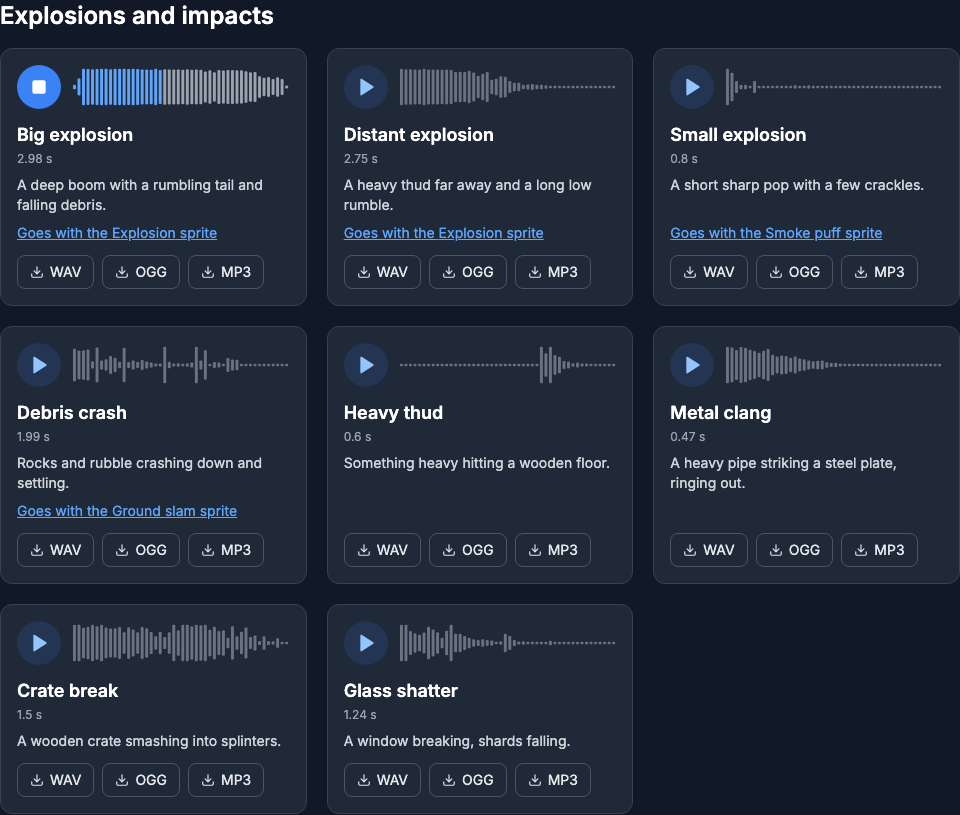
Press play on any card to hear it. Some cards also link to the sprite they go with, so the Big explosion leads to the explosion in the free effects pack and the coins to the spinning coin in the pickups pack. Download single files from the cards, or the whole pack in one ZIP: all three formats, or OGG only if you just want the small files.
Which format to use
- WAV is lossless, 16 bit at 48 kHz. Use it in Unity, which converts audio on import anyway, so it should start from the best copy. Use it for anything you plan to edit, and for short sounds in Godot, whose documentation recommends WAV for short and repetitive sound effects.
- OGG (Ogg Vorbis) is a fraction of the size. Godot recommends it for music, speech and long sound effects, so it suits the ambient loops there. It's also the natural choice for browser games.
- MP3 plays in every browser. Ship it as a fallback next to the OGG in web games, but don't use it for anything that loops.
Why MP3 loops skip
An MP3 encoder adds a little silent padding at the start and the end of the file. The format has no standard place to record how much, so encoders write it into an extra tag (the LAME info tag) and leave it to the decoder to cut it off again. Not every decoder reads that tag. When one doesn't, the padding plays every time the loop comes around, and a steady sound like rain gets a tiny hole at the seam.
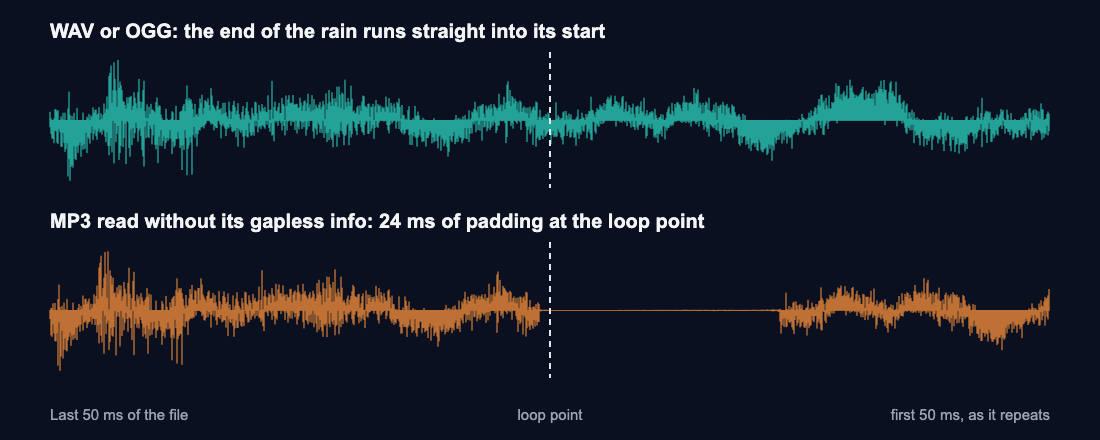
Ogg Vorbis doesn't have this problem, because its padding is trimmed off as part of decoding, and a WAV has none to begin with. The loops in the pack (all eight ambient sounds, the Force field and the Portal) are cut so their end runs straight into their start, so as long as you loop the WAV or the OGG, you won't hear the seam.
Keep repeated sounds from wearing thin
A coin you collect two hundred times a level starts to grate if it's identical every time. Three habits help with any engine:
- Vary the pitch a little. Play each coin, footstep or hit at a random pitch between about 95% and 105%. It's too small to sound like a different sound, but enough that a run of them stops sounding mechanical.
- Let quick repeats overlap, up to a limit. If a new coin cuts off the last one, fast pickups sound choppy; if nothing limits them, ten coins at once get loud. Allow three or four at a time.
- Give ambience its own volume. Because the sounds are already balanced against each other, start them all at the same level, then turn the ambient loops down (half volume is a good start) so they sit behind the action. Separate buses or mixer groups for effects, interface and ambience make that one setting instead of fifty.
Godot 4
Copy the files into your project. For the ambient loops, select the OGG in the FileSystem dock, tick Loop in the Import dock and press Reimport. Then add an AudioStreamPlayer to a node that stays in the scene, such as the player. If you put it on the coin itself and the coin frees itself when collected, the sound is removed with it.
# player.gd
@onready var coin_sound: AudioStreamPlayer = $CoinSound

func collect_coin() -> void:
	coin_sound.pitch_scale = randf_range(0.95, 1.05)
	coin_sound.play()
pitch_scale changes pitch and speed together, which you won't notice at 5%. Set Max Polyphony on CoinSound to 3 or 4: it's how many sounds the player can play at once, and calling play() past that limit cuts off the oldest one. If you'd rather not write code, wrap the sound in an AudioStreamRandomizer resource and set Random Pitch to 1.05; it picks a pitch between 1/1.05 and 1.05 on every play. For the sprite side of the same coin, see Godot 4 sprite animation.
Unity
Import the WAV files. For short sounds, keep Load Type on Decompress On Load, which the Unity manual recommends for smaller sounds; for the ambient loops, Streaming keeps memory use low. To play an ambient loop, add an Audio Source with the clip, tick Loop and Play On Awake, and lower its volume.
For pickups, one source and PlayOneShot is enough:
using UnityEngine;

public class PickupSound : MonoBehaviour
{
    [SerializeField] AudioSource source;   // Play On Awake off
    [SerializeField] AudioClip coin;       // coin-bell.wav

    public void PlayCoin()
    {
        source.pitch = Random.Range(0.95f, 1.05f);
        source.PlayOneShot(coin);
    }
}
PlayOneShot doesn't cancel clips that are already playing on that source, so quick pickups overlap instead of cutting each other off. The animation side is in Unity sprite sheet animation.
Phaser 3
Load each sound as OGG with an MP3 fallback: Phaser plays the first file in the list that the browser supports. One more thing matters on the web: browsers don't let a page start sound until the player clicks, taps or presses a key. Phaser calls that state locked, and tells you when the first input unlocks it, so start the ambience then:
class Level extends Phaser.Scene {
  preload() {
    this.load.audio('coin', ['sounds/coin-bell.ogg', 'sounds/coin-bell.mp3'])
    this.load.audio('rain', ['sounds/rain.ogg', 'sounds/rain.mp3'])
  }

  create() {
    const startRain = () => this.sound.play('rain', { loop: true, volume: 0.5 })
    if (this.sound.locked) this.sound.once(Phaser.Sound.Events.UNLOCKED, startRain)
    else startRain()

    this.input.on('pointerdown', () => {
      this.sound.play('coin', { detune: Phaser.Math.Between(-100, 100) })
    })
  }
}
detune is in cents, so plus or minus 100 is plus or minus one semitone, about 6%. We ran this scene with Phaser 3.90 in Chromium and WebKit with sound blocked until the first click: both loaded the OGG files, the rain started on the first click, looping at half volume, and every click played a coin at a different pitch. Loading sprites for the same scene is covered in Phaser sprite sheets and atlases.
Use them anywhere
The whole pack is CC0 1.0: use the sounds in commercial or personal games, videos, streams and apps, change them, and share or sell what you make with them, without asking and without credit. You can pass the files on as they are, too. A link to SpritePilot is always welcome, never required.
Hear all 78 sounds, and if your game needs art as well, the free game assets have matching pixel-art sprites, tiles and effects under the same license.